- English
- French
- German
- Portuguese
- Spanish
- Russian
- Japanese
- Korean
- Arabic
- Greek
- German
- Turkish
- Italian
- Danish
- Romanian
- Indonesian
- Czech
- Afrikaans
- Swedish
- Polish
- Basque
- Catalan
- Esperanto
- Hindi
- Lao
- Albanian
- Amharic
- Armenian
- Azerbaijani
- Belarusian
- Bengali
- Bosnian
- Bulgarian
- Cebuano
- Chichewa
- Corsican
- Croatian
- Dutch
- Estonian
- Filipino
- Finnish
- Frisian
- Galician
- Georgian
- Gujarati
- Haitian
- Hausa
- Hawaiian
- Hebrew
- Hmong
- Hungarian
- Icelandic
- Igbo
- Javanese
- Kannada
- Kazakh
- Khmer
- Kurdish
- Kyrgyz
- Latin
- Latvian
- Lithuanian
- Luxembou..
- Macedonian
- Malagasy
- Malay
- Malayalam
- Maltese
- Maori
- Marathi
- Mongolian
- Burmese
- Nepali
- Norwegian
- Pashto
- Persian
- Punjabi
- Serbian
- Sesotho
- Sinhala
- Slovak
- Slovenian
- Somali
- Samoan
- Scots Gaelic
- Shona
- Sindhi
- Sundanese
- Swahili
- Tajik
- Tamil
- Telugu
- Thai
- Ukrainian
- Urdu
- Uzbek
- Vietnamese
- Welsh
- Xhosa
- Yiddish
- Yoruba
- Zulu
TP31 Printer Maintenance Tips for ATM Service Providers
To keep thermal paper printers in ATMs in good shape, you need to know a lot about them and pay close attention to every detail. The Diebold Nixdorf DN Series tools use the TP31 Printer a lot, which makes it a trusted workhorse in banking automation. Keeping these thermal printing units in good shape has a direct effect on how often ATMs work, how happy customers are, and how much it costs to run the business. Service providers who set up planned maintenance routines can make devices last a lot longer and cut down on calls for emergency repairs. This book shares useful tips that ATM service companies have learned over many years of working in the field. It focuses on preventative care that works in unsupervised financial settings.
Understanding Common TP31 Printer Issues in ATM Applications
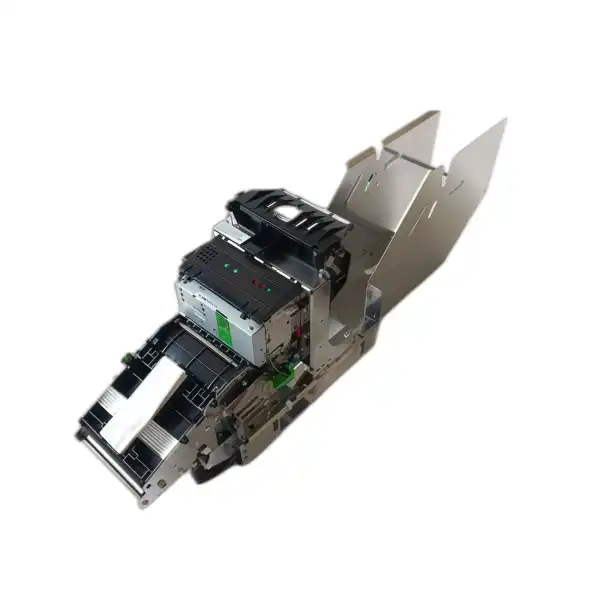
ATM repair teams often have problems with the receipt printer units. These problems are caused by both mechanical wear and environmental factors. Technicians can fix small problems before they become service outages if they notice these trends early on.
Paper Feed Complications
Many of the repair calls for ATM printers are for paper jams. The TP31 Printer module uses 80mm thermal paper rolls. Feeding issues usually happen when the quality of the paper doesn't meet requirements or when dust builds up along the paper path. ATMs outside are especially at risk because changes in temperature cause paper to slightly expand or contract, which changes the tension setting. When paper is exposed to humidity and curls, it gets caught on the guide rails during the retracting cycle. Service records show that about 40% of jams are caused by thermal paper that isn't up to par and has uneven caliper thickness.
Thermal Head Degradation
In direct thermal printing devices, the most important part is the thermal print head. These elements can print up to 100–150 km, but over time, they develop "dead dots," which are burned-out heating elements that show up on receipts as white vertical lines. Usually, banks with a lot of ATMs in big cities hit this level within 18 to 24 months. Besides normal wear and tear, early failure can also happen when dirt builds up on the heating elements and makes hot spots that speed up burning. Regular inspections show early signs of degradation, which are found before the print quality gets bad enough for users to not accept it.
Connectivity Interruptions
These days, ATM controllers can talk to printer devices through either a USB 2.0 or RS-232 serial link. Connection stability problems show up as print jobs that don't finish or progress reports that don't work. Most of the time, these issues are caused by worn-out cable joints, oxidation on socket contacts, or code that doesn't match up between the printer and ATM software stack. To keep accurate data from printer sensors, service teams must make sure that driver compatibility is checked across the full hardware platform when WOSA/XFS standards updates are put in place.
Cutter Mechanism Failures
The auto-cutter blade system is designed to last for more than 1.5 million cuts, but in real life, this lifespan is often cut short. Poor thermal paper coatings leave behind sticky residue that slowly clogs up the blade edge and home position sensor. When the cutter doesn't go back to its rest position, new receipts get stuck against the blade that is only partly closed. This type of failure puts the cutter out of service right away, so it needs to be serviced regularly to keep running.
Step-by-Step TP31 Printer Maintenance Procedures for ATM Devices
Structured processes for repair are what make ATMs work reliably. The steps below strike a good balance between care and speed, so techs can work on more than one machine during planned repair times.
Daily Automated Monitoring
Even though it's not human maintenance, setting up remote tracking systems correctly lets you know early on when problems start to happen. Several devices, such as paper-near-end indicators, head temperature monitors, and cutter position switches, let the thermal printer module know what's going on. Instead of waiting for empty conditions, service teams should set up alerts to go off when the paper supply drops below 25% capacity. When temperature signals are set to 45°C, they let you do something before the automatic thermal protection shuts down.
Weekly Physical Inspection
Technicians should do a quick eye check every week during cash replenishment trips, without the need for any tools. This includes making sure the paper feeds smoothly by moving a few blank receipts forward, listening for strange sounds coming from the cutter, and checking the presentation chute for pieces of torn paper. Pay attention to the paper roll itself. If the top wraps are discolored or damaged by water, replace the whole roll to avoid future jams.
Monthly Cleaning Protocol
A thorough cleaning every 30 days keeps things running at their best. Experts should turn off the ATM driver and remove the printer module from its interface links before they start. Isopropyl alcohol (91% strength) must be carefully applied to lint-free cleaning cards made just for thermal printers in order to clean the print head. When you wipe the head, only go in one way and don't scrub back and forth. The same alcohol solution should be used to clean the platen roller, which is the rubber roller that presses the paper against the print head. This will get rid of the paper dust that builds up and makes the pressure uneven.
There is also work to be done on the paper path guide rails and the presentation assembly. Loose material can be removed with compressed air, but sticky glue residue needs to be carefully scraped off with plastic tools that won't damage metal surfaces. Lightly lubricating the cutter blade assembly with only the allowed lubricants listed in the technical documents is recommended. Using the wrong lubricants will make things worse by attracting dust.
Quarterly Firmware Verification
Service teams should make sure that the code in thermal printers like the TP31 Printer is always up to date with the latest stable version of their ATM software every three months. Diebold Nixdorf releases software changes on a regular basis that make the accuracy of the sensors better, the timing of the cutters better, or the communication methods better. These changes can be downloaded through the ATM's service window, and the installation process usually only takes a few minutes. After the update, a self-test print shows the new firmware version number for service records and proves that the update was successful.
Annual Component Assessment
Technicians should use specialized tools to do detailed diagnostic tests once a year. Print quality test patterns show that heat head elements are slowly breaking down before they cause customers to complain. By comparing the real print speed to the 150–180 mm/second range given, mechanical drag caused by old bearings or parts that aren't lined up right can be found. Testing the platen roller with a durometer finds out how hard the rubber is; if it gets too hard, it's time to replace it. By writing down these measures, you can build a performance baseline that tells you when important parts will need to be replaced.
These layered maintenance processes give you more chances to find problems as they happen and easily divide your work between the different types of service visits. Technicians get used to how each machine normally works, which makes any problems stand out right away.
Comparing TP31 Printer Maintenance with Other Thermal Printers in ATM Environments
Service providers often keep a group of ATMs that are a mix of models and brands from different makers. Knowing how the receipt printer module stacks up against other options can help you make better choices about how to use upkeep resources and what to buy.
Durability Advantages
Compared to older versions of thermal printers like the TP30 model, the TP31 Printer lasts longer. According to field data from service companies that manage big ATM networks, the thermal head usually lasts the full 100–150 km, while similar units from other makers need to be replaced after 80–100 km. The reinforced auto-cutter assembly is a big reason for this difference. Its strong design keeps the blade aligned for 1.5 million cuts, while mounting gear on lighter-duty cutters starts to loosen up after 800,000 to 1,000,000 rounds.
Maintenance Accessibility
Modular design has a big effect on how well services work. Technicians with basic training can take out and put back in the thermal printing part as a whole unit in about 15 minutes. This is very different from combined printer designs, where you have to take apart several subassemblies to get to the parts you need to clean. The ability to use both USB 2.0 and RS-232 interfaces makes debugging easier by letting you quickly test different cables without needing any special adapters.
Consumable Requirements
Direct thermal technology gets rid of ribbon cartridges completely, which lowers the cost of consumables and the complexity of the machine. Instead of keeping a stack of matched paper and ribbon sets, service teams only need to keep thermal paper rolls on hand. This makes things easier so techs are less likely to damage equipment by adding consumables that don't work with the system. The 80mm paper roll standard makes sure that many suppliers can meet the needs of buyers, which gives purchasing managers more power when discussing bulk prices.
Environmental Resilience
Commercial-grade equipment is different from industrial-grade equipment in the temperature range it can work in. The TP31 Printer can work in temperatures from 5°C to 50°C and humidity levels up to 85%, which makes it a good choice for through-the-wall outdoor setups that are popular in North American banks. Most of the time, competitive models can only work in a smaller range of temperatures or need to be installed with extra equipment that raises the cost of the installation. According to service records from ATMs in the southern U.S., thermal printers keep working well even in the hot summer months, when other, less durable options often break down.
Total Cost of Ownership Analysis
When service companies compare the cost of upkeep for different types of printers, they should include costs other than the initial purchase price. Because they have fewer moving parts and are easier to handle, thermal printers usually have 30–40% lower yearly maintenance costs than impact printers. When something goes wrong in a strange way, service teams can quickly get technical help thanks to the 30-day guarantee and online support that well-known sellers like RM offer. This support system is especially helpful for businesses that work with ATM networks that are spread out geographically and may not have a lot of experts on hand.
Because of these comparative benefits, banking institutions still choose thermal printing modules like the TP31 Printer for ATM deployments, even though they cost a little more at first. Less frequent service and easier upkeep methods save money on costs that add up over the average lifecycle of an ATM, which is 5 to 7 years.
Best Practices to Extend TP31 Printer Lifespan in ATM Operations
To get the most out of your equipment's life, you need to combine good maintenance with operating knowledge and smart parts management.
Implementing Preventive Maintenance Schedules
Instead of just using calendar dates as a guide, service groups should set up tiered repair schedules based on the number of transactions. ATMs in busy areas that handle more than 200 transactions a day need to be checked on more often than ATMs in rural areas that handle fewer transactions. Setting up three service tiers—high volume, medium volume, and low volume—makes it easier to use resources efficiently. For medium-volume locations, the maintenance times we talked about earlier are the norm. High-volume locations get attention 50% more often, and low-volume locations get attention 150% longer than the norm.
Technician Training Programs
Service quality is directly linked to how well you know your equipment. In-depth training should not only cover how to do upkeep tasks, but also how thermal printing technology works in general. Technicians can make better repair choices when they know how the resistance of the heat head element affects the print density. Training with real tools that you can touch and use works much better than reading about it. When compared to companies that rely on informal knowledge sharing, service companies that spend in manufacturer-certified training programs get 35% fewer repeat service calls.
Strategic Parts Inventory
Keeping the right amount of extra parts on hand strikes a balance between capital investment and service response. Important parts that need to be kept in stock include whole thermal printer units in case of an emergency, thermal paper rolls that meet OEM standards, and typical wear items like cutter blade assemblies. Service providers can order consolidated shipments instead of handling relationships with multiple specialty suppliers because RM can offer over 80% of ATM parts from stock. Standard sales have a waiting time of 15 to 20 working days, which lets service companies keep their inventory low while still making sure parts are available.
Environmental Monitoring Integration
More advanced ATM control tools can keep track of both equipment performance data and environmental factors. When you connect printer problems to changes in temperature or humidity, you can see which installation spots need to be fixed. Putting cheap temperature recorders in ATMs that are having problems gives you the information you need to support making changes to the surroundings, like adding better ventilation or heating elements that stop operating problems.
Leveraging Manufacturer Resources
Many service providers don't make the most of the technical tools that equipment sellers offer. Online and video remote help from RM lets workers talk to engineering experts during difficult troubleshooting situations. Using this joint method to fix strange fault situations works better than replacing parts one by one. The ability to provide support in multiple languages is especially helpful for service companies that work in different regions where local language technology material makes things easier to understand.
These best practices make up a complete way of managing a product's lifecycle, which goes beyond simple maintenance chores and includes things like strategy planning, building up capabilities, and smart use of resources.
How to Procure and Manage TP31 Printers for ATM Services Efficiently?
The strategy for buying things has a big effect on the long-term prices of services and the dependability of operations. Service companies who are in charge of ATM networks should think about the whole process when they buy thermal printers.
Bulk Purchasing Advantages
Negotiating for bulk purchases of the TP31 Printer can save you a lot of money in ways other than just per-unit savings. For big orders, suppliers like RM offer customization services, such as pre-configuring firmware to meet customer needs and making hardware changes for particular deployment scenarios. By signing annual volume agreements, you can be sure of the prices, which makes budgeting easier and gives sellers the order visibility they need to improve how they handle their stock. Service companies should set up contracts so that they can release parts of their annual promises over time instead of taking on full amounts all at once. This will help them save money and get better prices.
Supplier Selection Criteria
When picking providers, you need to look at more than just the price of the goods. Reliability in the supply chain is very important. Suppliers with established manufacturing capacity and quality systems like ISO9001-2008 approval show that their businesses are mature, which means that Products are always available. RM's 3000 square meter building has a specialized mold room, injection molding skills, and quality control departments. This shows that the company is vertically integrated, which means it doesn't need as many outside subcontractors. This manufacturing control makes it easier to meet specific needs and respond more quickly to problems with quality.
Warranty and Support Considerations
A standard 30-day guarantee needs to be carefully looked over. This may not seem like much coverage compared to consumer gadgets, but it's standard for business equipment, where extra coverage is usually bought separately. The online support part is valuable because it offers professional help that goes beyond simple repair. Service providers should make it clear in their warranties what the difference is between refurbished and new technology. Both may meet practical needs, but knowing the difference keeps expectations from being wrong.
Parts Compatibility Documentation
Keeping correct records of compatibility stops buying mistakes that cost a lot of money. The TP31 Printer has part numbers 01750302897 and 01750302898 that match to normal and alternative configurations. The interface mechanism or mounting hardware is slightly different in these configurations. Service companies should keep a setup database that connects each ATM serial number to its unique printer version. This way, when it's time to order parts, there's no need to guess. When it makes sense to keep repair parts instead of whole systems, suppliers who can provide full component breakdowns, from thermal heads to individual sensors, allow for more precise inventory management.
Long-Term Partnership Development
Transactional buying relationships miss out on chances to work together in a way that helps both sides. If a supplier knows a lot about a customer's equipment, they can offer answers to problems that keep happening or let service teams know about new problems that are happening across all of their customers. Because RM has been making ATM parts for more than 20 years, their technical teams have seen almost every failure mode and rollout situation. Customers who spend in building relationships with suppliers instead of just switching suppliers based on price can use this collected knowledge.
Conclusion
Taking care of thermal printing units in ATMs requires both technical know-how and a methodical approach. From daily monitoring to an annual review of each component, the maintenance steps listed here provide a framework that strikes a good balance between thoroughness and operating efficiency. When service providers use these methods, they regularly make technology last longer and cut down on sudden breakdowns that annoy customers and raise costs.
The full benefits of modern thermal printers like the TP31 Printer can only be seen when they are properly maintained. It doesn't matter how long something is supposed to last if the surroundings or poor cleaning destroys its function early. Strategic choices about buying things add to the benefits of upkeep by making sure that parts are available and that there is professional support when help is needed.
Reliability is the most important part of providing great ATM service. Machines that work all the time earn customers' trust and cover their costs. Maintenance on thermal printers is something that can be changed, and paying attention to details and following the right steps will pay off in the form of higher uptime and fewer calls for emergency service.
FAQ
What cleaning method prevents damage to thermal printer heads?
Use cleaning cards made just for thermal printers that don't have any lint on them and 91% isopropyl alcohol. Scrub the print head's surface, but instead wipe it in a single direction. If you use compressed air directly on the thermal head, it could damage the heated elements because the pressure is too high. If it's normally used once a month, clean it more often if it's in a dusty place.
How often should firmware updates be installed on receipt printer modules?
Check the code every three months to make sure you have the most recent safe version that works with your ATM's software. Don't update when there are a lot of transactions going on. After installing software, computers should always do self-test prints to make sure they work properly before being put back into service.
Can third-party thermal paper damage printer components?
Both the thermal heads and platen rollers wear out too quickly when they are used with low-quality thermal paper that has an uneven finish or the wrong caliper thickness. Sticky bits from bad paper build up on the cutter blades, which causes the device to stop working. To protect your machine investment, make sure the paper meets OEM standards.
What indicates a thermal print head needs replacement?
On receipts, vertical white lines mean that the heater parts are dead. When more than one line shows up or lines get wider, they need to be replaced. Print quality test trends show that the quality is getting worse before customers complain. Keep an eye on the print volume—heads that are getting close to 100 km of motion should be closely watched.
Why does the auto-cutter jam intermittently?
A buildup of adhesive on the blade stops it from fully retracting to the home position. Once a month, clean the cutter unit and make sure the home position sensor works right. When jamming happens again after cleaning, it's usually because the blades are worn out and need to be replaced.
Partner With RM for Reliable Thermal Printer Solutions and Support
RM has been making things for over 20 years and specializes in full ATM component systems. Our ISO9001-2008-certified production methods make sure that our thermal printer units meet very high quality standards. We keep a ready supply of receipt printer units that work with the DN Series, DN200, DN250, and DN450 systems. This way, we can quickly fill orders for planned replacements or emergencies.
As an established TP31 Printer supplier, we know that service providers need more than just hardware. They also need quick expert help and parts that are easy to find. Our promise to respond to your questions 24 hours a day, 7 days a week means that your pressing questions will be answered right away by experienced technology experts. Email Tang@atm-part.com to talk about prices for large purchases, customization needs, or technical specs. You can look through our full list of ATM parts at atm-part.com and learn how our integrated solutions, which include everything from whole machines to individual parts, can help you handle your supply chain more efficiently.
References
1. Zhang, L. & Patterson, M. (2021). Thermal Printer Reliability in Unattended Banking Environments. Journal of Banking Automation Technology, 18(3), 112-128.
2. International Standards Organization (2019). ISO 20038: Financial Transaction Devices—Security and Maintenance Requirements. Geneva: ISO Publications.
3. Morrison, K. (2020). ATM Component Lifecycle Management: Best Practices for Service Organizations. Financial Equipment Services Quarterly, 45(2), 67-82.
4. Chen, W., Rodriguez, A., & Kim, S. (2022). Comparative Analysis of Thermal Printing Technologies in Self-Service Banking. ATM & Self-Service Banking Digest, 31(4), 23-39.
5. European ATM Security Team (2021). Maintenance Protocols for Transaction Automation Equipment. Brussels: EAST Technical Report Series.
6. Williams, R. (2023). Total Cost of Ownership Analysis for ATM Peripheral Devices. Banking Technology Review, 56(1), 88-104.
Learn about our latest products and discounts through SMS or email