- English
- French
- German
- Portuguese
- Spanish
- Russian
- Japanese
- Korean
- Arabic
- Greek
- German
- Turkish
- Italian
- Danish
- Romanian
- Indonesian
- Czech
- Afrikaans
- Swedish
- Polish
- Basque
- Catalan
- Esperanto
- Hindi
- Lao
- Albanian
- Amharic
- Armenian
- Azerbaijani
- Belarusian
- Bengali
- Bosnian
- Bulgarian
- Cebuano
- Chichewa
- Corsican
- Croatian
- Dutch
- Estonian
- Filipino
- Finnish
- Frisian
- Galician
- Georgian
- Gujarati
- Haitian
- Hausa
- Hawaiian
- Hebrew
- Hmong
- Hungarian
- Icelandic
- Igbo
- Javanese
- Kannada
- Kazakh
- Khmer
- Kurdish
- Kyrgyz
- Latin
- Latvian
- Lithuanian
- Luxembou..
- Macedonian
- Malagasy
- Malay
- Malayalam
- Maltese
- Maori
- Marathi
- Mongolian
- Burmese
- Nepali
- Norwegian
- Pashto
- Persian
- Punjabi
- Serbian
- Sesotho
- Sinhala
- Slovak
- Slovenian
- Somali
- Samoan
- Scots Gaelic
- Shona
- Sindhi
- Sundanese
- Swahili
- Tajik
- Tamil
- Telugu
- Thai
- Ukrainian
- Urdu
- Uzbek
- Vietnamese
- Welsh
- Xhosa
- Yiddish
- Yoruba
- Zulu
How to Install ViVOpay Kiosk III CCR on NCR ATM
Paying with a contactless card reader (CCR) like the ViVOpay Kiosk III on NCR SelfServ ATMs needs careful attention to how the hardware is connected, how the software is set up, and how security measures are followed. To install, you have to physically mount the two-piece antenna assembly (like the 445-0763531 short cable version or the 445-0760686 long cable variant), connect the main control unit (009-0030943) via USB interface, install compatible drivers, set up encryption parameters, and test all transactions to make sure Apple Pay, Google Pay, and contactless EMV work across the 13.56 MHz NFC spectrum.
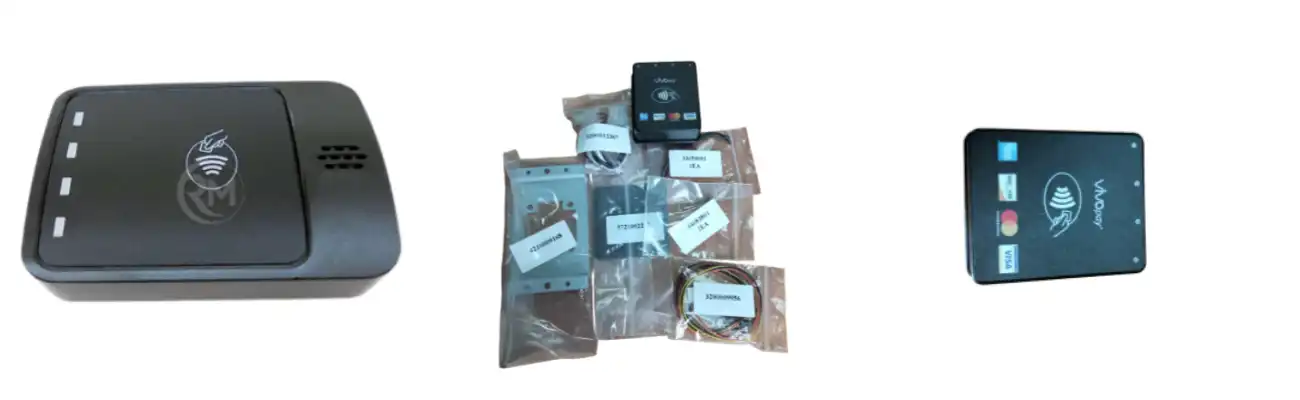
Understanding ViVOpay Kiosk III CCR and NCR ATM Compatibility
Before you start installing this reader, you need to make sure you know how it works with the NCR ATM system. Modern mobile wallets and contactless bank cards can be used with this gadget because it meets ISO 14443 Type A/B standards. This reader is great for banks because it has a unique two-piece design that separates the weatherproof antenna from the processor board. This design solves the problem of RF interference that is common in metal ATM casings.
Hardware Specifications and Communication Interfaces
Through USB, the main control unit can connect to NCR SelfServ machines and get power from a wide range of energy inputs, from 7.5V to 45VDC. Because of this, different ATM types can use different power rail standards without having to use extra voltage converters. The antenna system comes with both short (445-0763531) and long (445-0760686) cables. It works at a read range of about 4–10 cm, which is the best for reliably detecting cards without customers having to press their cards directly against the glass.
Security Standards and Encryption Protocols
Security compliance is still a must when deploying banking tools. The smart card reader uses both TDES and AES encryption methods along with DUKPT key management to make sure that all transactions meet PCI DSS standards. The SRED (Secure Reading and Exchange of Data) approval adds extra layers of security to protect private cardholder data while it's being sent. These security measures keep both financial institutions and end users safe from possible data breaches, which are becoming a bigger worry as the use of mobile payments spreads around the world.
Environmental Durability for Outdoor Deployment
The IP65/IP66 grade for ingress protection will be appreciated by NCR ATM owners who are in charge of outdoor installations. The UV-stabilized plastic housing doesn't break down when left out in the sun for a long time, and it stays structurally sound in temperatures ranging from -25°C to 70°C. This package comes with a weather gasket (009-0030949) that helps seal the external antenna even more. This keeps dust and wetness out, which could damage the RF performance or computer parts. The device is very reliable for mission-critical payment systems, with an MTBF value of more than 100,000 hours.
Preparing for Installation – Requirements and Preliminary Checks
When you're ready, work goes much faster and mistakes that cost a lot of money don't happen. Before opening the ATM box, service workers should make sure they have all the tools they need and that the system works with others.
Essential Hardware Tools and Components
You'll need basic hand tools like Phillips and flathead screwdrivers, wire management clips, and maybe a drill with the right bits for fixing hardware if your ATM bezel needs new holes in it. Make sure you have everything you need, including the weather gasket (009-0030949), mounting brackets, link wires, the main control unit (009-0030943), and the antenna assembly setup you picked. Before you start installing, check each part for damage from shipping.
Software and Firmware Verification
Get in touch with an NCR service agent or use the troubleshooting menu to find out what version of software is currently installed on your ATM. The RFID reader needs tools and drivers that work with the ATM application software you already have. Get the latest firmware and driver package for the ViVOpay Kiosk III from the official route for delivery. Make sure that the operating system on your NCR SelfServ model meets the basic requirements. Usually, these are Windows-based systems that run certain versions of APTRA or similar ATM control software.
Power Supply and Network Assessment
Check the ATM's internal power distribution to make sure the voltage rails match the input range of 7.5V to 45VDC. Write down how the USB ports are currently assigned, since you'll need one for the wireless reader. If all of the built-in ports are already taken by devices like cash registers, document printers, and card readers, some older NCR models might need a charged USB hub. If you do a full system backup before installing something, you won't lose any data if changes to the settings make the system act in a strange way.
Step-by-Step Installation Guide for ViVOpay Kiosk III CCR on NCR ATM
Organizing the installation into separate stages helps keep things in order and makes sure that no important steps are missed. This orderly approach has been improved by thousands of successful deployments in a wide range of ATM settings.
Physical Hardware Installation
Turn off the ATM fully and unplug it from the power source. Never try to install something that is already powered on. To get to the ATM Card Reader bay, open the upper cabinet. Depending on how your ATM bezel is made, the ViVOpay Kiosk III can be installed, and its contactless reader antenna can be mounted on the outside face or behind an RF-transparent window. The 445-0763531 short cable assembly works well for small setups where the controller sits right behind the fascia. The 445-0760686 long cable version, on the other hand, can be used when the antenna needs to be farther away from the main control unit.
Carefully place the antenna unit so that it is in line with the area where customers can connect with you. The antenna needs to stay at a certain gap distance from metal objects so that the signal doesn't get weak. This distance is usually between 5 and 8 mm, but it depends on the material of the bezel. Use the fixing tools that came with the antenna to keep it in place. If you're putting it outside, use the weather gasket (009-0030949). Avoid sharp edges that could damage the insulation as you run the antenna wire through the bezel hole. Make sure there are no obvious gaps when you connect the antenna wire to the main control unit (009-0030943).
Place the main control unit inside the ATM cabinet in a spot that lets air flow well and keeps it safe from mechanical stress. Use the USB cord to connect the main control unit to a free USB port on the ATM's computer. Secure all the wires with cable ties to keep it from getting in the way of moving parts like cash cassette boxes or devices that move cards. Before you move on to program setup, make sure all of the connections are tight.
Software Configuration and Driver Installation
Turn on the ATM and wait for the operating system to find the new USB drive. Follow the manufacturer's installation wizard to set up the ViVOpay Kiosk III software package. It's possible that the system needs to be restarted to finish installing drivers and properly identify the new hardware. Go to the area for peripheral devices in the ATM setup tool. Add the smart card reader to the list of devices and set up the right connection settings.
Set the encryption settings so that they follow the security rules of your bank. Load the encryption keys using the key injection methods your company has in place. Usually, this needs special tools and authorization codes that your payment processor or acquiring bank will give you. Set the transaction timeout, read range sensitivity, and card types that can be used (contactless EMV, mobile wallet numbers) based on how your business works. Save the settings and make sure that the contactless reader is seen as a valid payment entry device by the ATM control software.
Functional Testing and Validation
Before putting the ATM back into service, it should be thoroughly tested. First, check the gear to make sure that the antenna and processor can talk to each other. The diagnostic tool should show the RF field strength, the state of the antenna tuning, and the version of software on the controller. You can test reading different kinds of contactless cards, such as EMV contactless bank cards, test cards from your payment processor, and mobile wallets like Apple Pay, Google Pay, and Samsung Pay, if they are allowed.
Check the whole transaction process, including checking the amount, taking out cash, and depositing money, if your ATM allows contactless payments. Make sure that the transaction records print properly and have the right contactless transaction signs on them. Check the audit logs to ensure that the transaction records contain all the cardholder verification method (CVM) data and cryptogram information needed for the payment process. For the ViVOpay Kiosk III, check the antenna's read range from different spots in the marked tap zone to make sure the same level of performance is seen throughout the whole customer contact area.
Best Practices and Security Measures During Installation
Following best practices in the business during installation will protect your investment and make sure you're following the rules. These standards are based on what we've learned from deploying thousands of ATMs in the field.
Technician Certification and Authorization
Contactless reader installations should only be done by trained techs who have had the right training. When installing financial equipment, you have to be very careful. If you don't do it right, you could leave security holes or have transactions fail, which would hurt customer trust. Technicians should know about the physical security standards set by PCI DSS. These include where to put tamper-evident seals and how to open secure cabinets. For compliance tracking, keep thorough installation records with serial numbers, setup settings, and test results.
Handling Sensitive Components and Key Material
During the activation process, be very careful with the encrypted key material. Key injection methods must be done in safe places that follow your company's rules for managing private keys. Never send or store encryption keys over unprotected lines or store them in plain text. When working with the controller board, make sure you ground yourself properly and wear an anti-static wrist strap to avoid electrical discharge. The main control unit has sensitive security components.
Ongoing Maintenance and Update Schedules
Set up regular maintenance times to check the weather sealing, mounting tools, and wire connections. Inspections every three months are especially helpful for outdoor systems because they find problems like UV damage, seal wear, and growing looseness before they cause service interruptions. You can get information on newly found vulnerabilities in your contactless reader's firmware by subscribing to security alerts from both NCR and the maker of the reader. Set up a patch management system that tries updates in a controlled setting before putting them on real ATMs. This will lower the chance that updates will cause service interruptions.
Comparison Insights: ViVOpay Kiosk III CCR Integration vs Other Payment Solutions on NCR ATM
When buying teams know how this contactless reader stacks up against other options, they can make smart choices that fit their budget and business needs.
Performance Advantages Over Predecessor Models
When compared to the older Kiosk II form, the ViVOpay Kiosk III is clearly better. The improved two-piece design isolates RF signals better, making installation easier in metal structures that can be hard to work with. Read range uniformity has gone up by about 15 to 20 percent across a wider range of weather conditions. This means that customers don't have to retap as often, and transactions are completed faster. The wider voltage input range (7.5V-45VDC vs. the Kiosk II's narrower 12V-24V range) means that voltage regulation components are not needed in many setups. This cuts down on the number of parts and possible failure points.
Competitive Analysis Against Alternative Readers
When compared to Products from competitors like Pax and Verifone, the device has a clear setting. Pax readers often advertise lower starting costs, but they may need more work to be integrated and come with fewer NCR platform options that have already been tested and approved. Verifone solutions offer strong security features like the ViVOpay Kiosk III, but they usually cost more per machine and take longer to get new parts. The ViVOpay Kiosk III strikes a good balance between the level of security approval, the ease of connection, and the total cost of ownership for operators who run a mix of ATMs.
Long-Term Value Proposition for B2B Buyers
Total cost of ownership analysis includes more than just the price of the tools itself. With an MTBF rating of 100,000 hours or more, the ViVOpay Kiosk III can run continuously for 11 years or more, which is a lot longer than devices with ratings of 50,000 to 70,000 hours. Because antenna parts, weather gaskets, and processor units can all be bought separately, they can be fixed instead of being replaced as a whole. This extends the unit's useful life and cuts down on waste. Over the course of five to ten years, these reliability and serviceability factors save ATM owners a lot of money when they are deciding how to run their businesses.
Conclusion
Adding the ViVOpay Kiosk III contactless card reader to NCR SelfServ ATMs is a smart move that puts banks in a better position to meet customers' growing demand for contactless payment choices. Even though hardware mounting, software configuration, and security measures need to be taken into account, the installation process is well-thought-out and can be done quickly by experienced ATM techs. The device's two-piece design solves common problems with RF interference, and its strong environmental protection and security standards make sure it works reliably in a wide range of placement situations. To be successful, you need to plan carefully, follow best practices, and keep up with upkeep.
FAQ
Is the ViVOpay Kiosk III compatible with all NCR SelfServ ATM models?
Most NCR SelfServ units can connect to the contactless reader through a normal USB port. The version of operating system and communication software on your ATM determines whether it is compatible. Before you buy, look at the NCR technical paperwork or call your ATM service provider to make sure it will work with your model.
What security certifications does the device maintain after installation?
Following PCI DSS rules, the main control unit (009-0030943) can handle TDES/AES encryption and DUKPT key management. The SRED certification adds extra security to user info while it's being sent. To keep these certifications, you have to follow the right steps for key injection and update the code as soon as security fixes become available.
Can installation be completed without professional technical assistance?
It is strongly suggested that the installation be done by trained experts. Working inside locked ATM machines, handling encryption key material, and setting up payment system software are all parts of the process that need special skills and permission. If you don't install something correctly, it could risk security, break compliance rules, or stop transactions from going through.
Partner with RM for Your Contactless Reader Deployment
With more than 20 years of experience, HONGKONG RONG MEI TECHNOLOGY has been providing ATM parts to banks all over the world. As a well-known company that provides contactless card reader solutions, we keep a large stock of the ViVOpay Kiosk III system, which includes all of its important parts, such as antenna kits (445-0763531 and 445-0760686), weather seals (009-0030949), and main control units (009-0030943). Our ISO9001-2008-certified processes make sure that the standard of both new and professionally refurbished units is always the same.
We know how important it is to get ATM repair done quickly. Standard shipping times for most modules are between 15 and 20 working days, but faster choices are available for important operations. Technical support is available 24 hours a day, seven days a week, and in multiple languages. They can help with startup problems quickly through online diagnostics and video chat. Whether you need new parts for a few items or whole contactless reader systems for an entire fleet, our team provides quick service that fits your working schedule. Get in touch with Tang@atm-part.com to talk about your NCR ATM contactless payment needs and get full technical specs for your unique deployment situation.
References
1. National Automated Clearing House Association. "Contactless Payment Technology Standards for Financial Institution Deployment." NACHA Operating Rules & Guidelines, 2023 Edition.
2. PCI Security Standards Council. "PIN Transaction Security Point of Interaction Security Requirements v6.0." Payment Card Industry Data Security Standard Technical Documentation, 2022.
3. ISO/IEC 14443 Standards Committee. "Identification Cards - Contactless Integrated Circuit Cards - Proximity Cards: Physical Characteristics and Radio Frequency Power Interface." International Organization for Standardization Technical Specification, 2021.
4. ATM Industry Association. "Best Practices for Contactless Reader Integration in Self-Service Banking Environments." ATMIA Technical Standards Publication, 2023.
5. NCR Corporation. "SelfServ ATM Series: Peripheral Device Integration Technical Reference Manual." NCR Financial Services Hardware Documentation, Version 8.4, 2022.
6. EMVCo Technical Working Group. "EMV Contactless Specifications for Payment Systems Book C-2: Kernel 2 Specification." EMV Integration Process Guide, Version 3.0, 2023.
Learn about our latest products and discounts through SMS or email