- English
- French
- German
- Portuguese
- Spanish
- Russian
- Japanese
- Korean
- Arabic
- Greek
- German
- Turkish
- Italian
- Danish
- Romanian
- Indonesian
- Czech
- Afrikaans
- Swedish
- Polish
- Basque
- Catalan
- Esperanto
- Hindi
- Lao
- Albanian
- Amharic
- Armenian
- Azerbaijani
- Belarusian
- Bengali
- Bosnian
- Bulgarian
- Cebuano
- Chichewa
- Corsican
- Croatian
- Dutch
- Estonian
- Filipino
- Finnish
- Frisian
- Galician
- Georgian
- Gujarati
- Haitian
- Hausa
- Hawaiian
- Hebrew
- Hmong
- Hungarian
- Icelandic
- Igbo
- Javanese
- Kannada
- Kazakh
- Khmer
- Kurdish
- Kyrgyz
- Latin
- Latvian
- Lithuanian
- Luxembou..
- Macedonian
- Malagasy
- Malay
- Malayalam
- Maltese
- Maori
- Marathi
- Mongolian
- Burmese
- Nepali
- Norwegian
- Pashto
- Persian
- Punjabi
- Serbian
- Sesotho
- Sinhala
- Slovak
- Slovenian
- Somali
- Samoan
- Scots Gaelic
- Shona
- Sindhi
- Sundanese
- Swahili
- Tajik
- Tamil
- Telugu
- Thai
- Ukrainian
- Urdu
- Uzbek
- Vietnamese
- Welsh
- Xhosa
- Yiddish
- Yoruba
- Zulu
TP27 Printer Installation Guide for ProCash and CINEO Series
The TP27 printer module (Part No. 01750256247 / 1750256247) is a thermal receipt and journal printing unit built specifically for Wincor Nixdorf ProCash and CINEO series ATMs, including the C4060. Printing at speeds exceeding 150mm per second at 203 dpi, it supports 24/7 operation in demanding banking environments. Whether you are replacing a failed unit on the floor or building regional parts inventory, this guide walks you through installation, troubleshooting, and procurement decisions — so your ATMs stay compliant and your transactions keep printing.
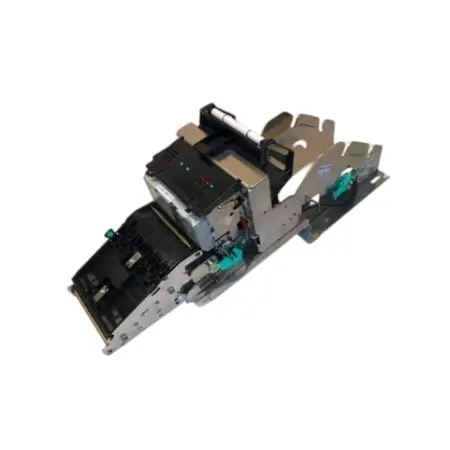
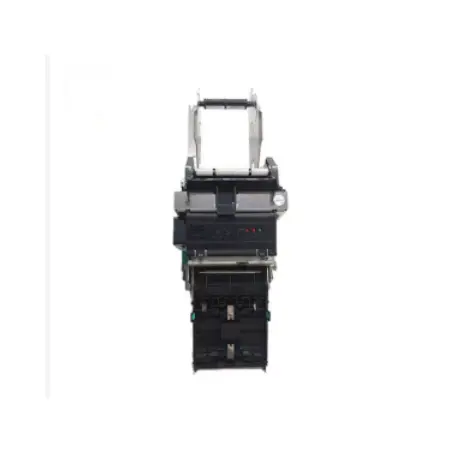
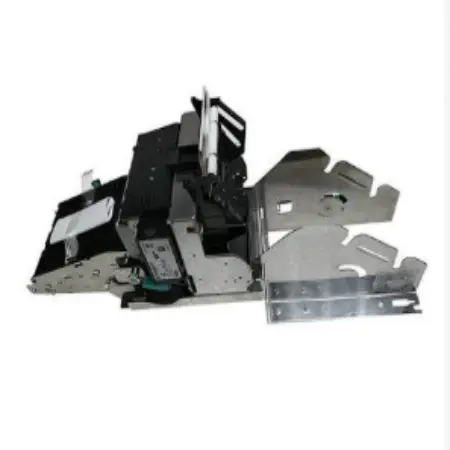
Understanding the TP27 Printer Module
What This Module Actually Does?
A thermal printing unit inside every ProCash and CINEO ATM makes two important outputs: the customer receipt and the internal transaction journal. The notebook record is needed by inspectors to make sure that the rules are followed. From a regulatory point of view, the ATM is not working when the printer stops working. The Diebold Nixdorf TP27 receipt printer module is one of the most frequently serviced parts in their ATM fleets because it does both jobs with a single mechanism.
Core Technical Specifications
Knowing how the hardware works before putting it together saves time on the floor. The TP27 has the following important specs:
| Parameter | Specification |
|---|---|
| Part Number | 01750256247 / 1750256247 |
| Print Head Model | SHEC TL80 (01750256692) |
| Print Resolution | 203 dpi |
| Print Speed | >150mm/second |
| Paper Width | 80mm |
| Cutter Rating | >1,000,000 cuts |
| Compatible Models | Wincor Nixdorf ProCash, CINEO C4060 |
| Interface | USB / V.24 (Serial) |
| Warranty | 30 days + online support |
Compatibility Range Across ATM Models
The module uses the WOSA/XFS driver design, which lets it work with both the ProBase and Agilis software stacks without the need for custom code. It can handle thermal paper densities between 55g and 80g, which gives field engineers options for different paper stock standards in different areas. The two sensor arrays pick up on both "Paper Low" and "Paper Out" states and send real-time alerts to the ATM's main monitoring system.
Step-by-Step TP27 Printer Installation for ProCash and CINEO Series
Pre-Installation Checklist
Make sure these things are ready before you touch the hardware:
- ATM is powered down and the safe door protocol is followed per your organization's security policy.
- Replacement unit (01750256247) is confirmed against the machine's existing part number.
- Tools on hand: Phillips PH2 screwdriver, ESD wrist strap, compressed air canister, and isopropyl alcohol wipes.
- WOSA/XFS driver version matches the ATM's software stack (check ProBase or Agilis version in the ATM's diagnostic menu).
Most installations of the TP27 printer module fail on the first try because they don't follow this checklist. A gadget that works can stop working in just a few days if the software version is wrong or there is no ESD protection.
Physical Installation Procedure
When the ATM is turned off, take off the front panel and find the printer part that is already there. First, take out the USB or V.24 cable harness. Then, loosen the two screws that are holding the printer bracket in place. Carefully slide the old module out of the case. Paper dust often settles inside, so blow it clean before putting in the new one. Make sure the new TP27 receipt printer module fits securely into the bracket. Tighten the screws but do not overtorque them. Then, connect the wire harness back up. Click the connector to make sure there is no damage to the pins that can be seen.
Software Configuration and Print Test
Turn the ATM back on and go to the diagnostics menu. Go to the printer subsystem and print a self-test page. The SHEC TL80 print head is in the right place if the test receipt is clean, with no white vertical lines, slant, or rough cuts. Do a second test for journal output if the journal function is turned on. Record the outcome with a time stamp; your compliance team will need this record. If the driver version is the same, the module usually doesn't need to be calibrated by hand.
Troubleshooting Common Installation and Operation Issues
Hardware Connection Problems
If the ATM still says "Printer Not Found" after installation, it's most likely because the wire harness isn't secure. Turn off the ATM, reseat the connector, and make sure that the controller board's dip switch settings match the type of interface on your ATM (USB vs. V.24). When switching units between different ProCash model types, it's common to make a mistake with the interface settings.
Print Quality Defects
If you see vertical white lines on your receipts, it means the print head is broken or dirty. Clean the surface of the SHEC TL80 head with isopropyl alcohol on a lint-free swab. If lines still show up after cleaning, some of the heating elements may have broken. In this case, the print head unit (01750256692) needs to be replaced instead of being cleaned. Using poor thermal paper speeds up head wear by a lot; the 100–150 km lifespan assumes paper with little gritty dust in it.
Cutter and Paper Feed Failures
If the cutter on the TP27 printer module doesn't go back after getting stuck, it means that the plastic gears are worn out or there is a mechanical blockage. To physically withdraw the blade, use the side-mounted cutter gear release wheel. Then, check the gear train for wear. Paper feed slippage, in which the length of the print seems to be cut off, is usually caused by a worn platen roller losing its grip on the paper. You don't have to change the whole module system because you can buy just the gear kit or the platen roller separately.
Comparing the TP27 with Other ATM Thermal Printer Modules
Performance Benchmarks
In the table below, you can see how the TP27 compares to other common alternatives used in ATMs:
| Feature | TP27 (ProCash/CINEO) | Generic Thermal Module | TP29 (01750302907) |
|---|---|---|---|
| Print Speed | >150mm/sec | 80–120mm/sec | >150mm/sec |
| Cutter Rating | >1,000,000 cuts | 200,000–500,000 cuts | >1,000,000 cuts |
| ATM Software Integration | WOSA/XFS native | Requires custom driver | WOSA/XFS native |
| Sub-Component Supply | 8 component categories | Limited | Available |
| Compliance Suitability | Banking-grade | General retail | Banking-grade |
Why Generic Alternatives Fall Short?
Generic temperature modules might be cheaper at first, but they don't work with ProBase or Agilis ATM software very often. This means that field engineers have to spend hours finding ways to get around driver problems, and the lower cutter ratings mean that machines break down more often in 24/7 banking settings. For ATM fleets that are always working, those extra service calls quickly wipe out any cost savings at first.
The TP29 as a Related Option
The same sub-component supply logic is used for tasks that need the TP29 version (Part No. 01750302907). Both modules work with WOSA and XFS, and having one supplier for both makes managing vendors easier. RM has both series in stock.
Maximizing the Value of Your ATM Printer Investment
Preventive Maintenance Schedule
ATM printer maintenance for the TP27 printer module is straightforward when it follows a fixed schedule. Clean the paper path and optical sensors with compressed air every 30 days. Wipe the print head with isopropyl alcohol every 60 days or after every 20km of printed paper, whichever comes first. Inspect platen roller grip and cutter gear condition quarterly. These steps keep the module performing at specification between part replacements and extend intervals between service calls.
Sub-Component Procurement Strategy
One of the most practical cost controls for ATM service companies is buying sub-components rather than full module assemblies. The TP27 receipt printer module breaks down into eight core component categories: print head, paper feed motor, control board, gear kit, platen roller, cutter assembly, sensor array, and chassis hardware. Sourcing only the failed component — rather than the entire unit — can reduce per-repair costs by 40–60% compared to full assembly replacement, based on standard ATM maintenance cost models used in the industry.
Here is a summary of sub-components available for independent procurement:
- Print Head (SHEC TL80 / 01750256692): Rated for 100–150km; replace when streaking cannot be resolved by cleaning.
- Paper Feed Motor: Controls paper advance speed and precision; a worn motor causes print length errors.
- Cutter Assembly & Gear Kit: Replace the gear kit before the cutter blade to extend overall mechanism life.
- Control Board: Required when firmware flashing or interface reconfiguration fails to restore function.
Keeping these components in stock means most field repairs can happen the same day, without waiting for a full module shipment.
Conclusion
Wincor Nixdorf ProCash and CINEO ATM fleets still use the TP27 printer module as their standard thermal printing solution. ATM businesses that have little to no downtime are different from those that don't because they have access to individual parts, do regular upkeep, and install them correctly. Whether you are a field service provider who needs parts the same day or a distributor building up regional stock, knowing this module's specs and how it fails will help you avoid unplanned outages. RM has both the full module and all the component categories in stock, so you don't have to wait until the ATM stops printing.
FAQ
Q1: What is the expected lifespan of the TP27 print head?
A: The SHEC TL80 print head is rated for approximately 100–150km of printed paper under normal banking conditions. Using thermal paper with high abrasive dust content reduces this figure significantly. Cleaning the head regularly with isopropyl alcohol extends service life.
Q2: Can the TP27 work with both USB and V.24 interfaces?
A: Yes. The module supports both interface types, but the cable harness and dip switch settings on the controller board must match the ATM's PC core configuration. Verify this before installation.
Q3: Is a refurbished TP27 suitable for banking environments?
A: A refurbished unit is acceptable when it has undergone Level 4 refurbishment — replacing the platen roller, cutter blade, and thermal print head. Simple cosmetic cleaning is not sufficient for 24/7 ATM operation.
Q4: What causes sensor errors after installation?
A: Sensor errors usually result from paper dust on the optical sensors. Clean the sensors near the paper path entry and exit points with compressed air. If errors persist, run the calibration routine in the ATM's diagnostics menu.
Q5: Does RM provide technical support after purchase?
A: Yes. RM provides 30-day warranty coverage and online remote support. Response time for technical inquiries is within 24 hours.
Get Your TP27 Printer Module from RM — Stock Available Now
RM has been a supplier of ATM printer parts for more than 20 years. Their factory in Shenzhen is ISO9001-certified and covers 3,000 square meters. We are a reliable source for TP27 printer modules, and we carry both new and used ones (Part No. 01750256247), as well as all eight types of sub-components. Contact Tony directly at Tony@atm-part.com to get a quote within 24 hours, whether you need a single replacement right away or a bulk purchase agreement.
References
1. Diebold Nixdorf AG. ProCash Series ATM Technical Service Manual. Diebold Nixdorf Technical Publications, 2019.
2. ATMIA (ATM Industry Association). Global ATM Security Guidelines and Best Practices. ATMIA, 2022.
3. Wincor Nixdorf International GmbH. CINEO C4060 Hardware Integration Guide. Wincor Nixdorf Technical Documentation, 2017.
4. NCR Corporation / Diebold Nixdorf. WOSA/XFS Standard for ATM Peripheral Device Integration. CEN/TC 224 Working Group, 2020.
5. International Organization for Standardization. ISO 9001:2015 Quality Management Systems — Requirements. ISO, 2015.
6. Thermal Head Manufacturers Association. Thermal Print Head Performance and Longevity Standards for Financial Terminal Applications. THMA Technical Report, 2021.
Learn about our latest products and discounts through SMS or email