- English
- French
- German
- Portuguese
- Spanish
- Russian
- Japanese
- Korean
- Arabic
- Greek
- German
- Turkish
- Italian
- Danish
- Romanian
- Indonesian
- Czech
- Afrikaans
- Swedish
- Polish
- Basque
- Catalan
- Esperanto
- Hindi
- Lao
- Albanian
- Amharic
- Armenian
- Azerbaijani
- Belarusian
- Bengali
- Bosnian
- Bulgarian
- Cebuano
- Chichewa
- Corsican
- Croatian
- Dutch
- Estonian
- Filipino
- Finnish
- Frisian
- Galician
- Georgian
- Gujarati
- Haitian
- Hausa
- Hawaiian
- Hebrew
- Hmong
- Hungarian
- Icelandic
- Igbo
- Javanese
- Kannada
- Kazakh
- Khmer
- Kurdish
- Kyrgyz
- Latin
- Latvian
- Lithuanian
- Luxembou..
- Macedonian
- Malagasy
- Malay
- Malayalam
- Maltese
- Maori
- Marathi
- Mongolian
- Burmese
- Nepali
- Norwegian
- Pashto
- Persian
- Punjabi
- Serbian
- Sesotho
- Sinhala
- Slovak
- Slovenian
- Somali
- Samoan
- Scots Gaelic
- Shona
- Sindhi
- Sundanese
- Swahili
- Tajik
- Tamil
- Telugu
- Thai
- Ukrainian
- Urdu
- Uzbek
- Vietnamese
- Welsh
- Xhosa
- Yiddish
- Yoruba
- Zulu
EPP V7 Installation Guide for Diebold Nixdorf Machines
To install the Encrypting Pin Pad version 7(EPP V7) on Diebold Nixdorf ATMs, you need to plan ahead and follow a set of steps. As an ATM service provider with more than 20 years of experience, we put together this detailed installation guide to help procurement managers, field workers, repair companies, and financial institutions quickly and correctly install this important security feature. There has been a big step forward in PIN encryption technology with the EPP V7. It is now more difficult to hack and meets higher PCI compliance standards. This guide walks you through every step, from getting ready for installation to making sure everything is working properly afterward, so that your ATM fleet stays safe and available. This guide gives you useful information that you can use right away to reduce downtime and increase your return on investment, whether you are in charge of a single store or a regional network of ATMs in several markets.
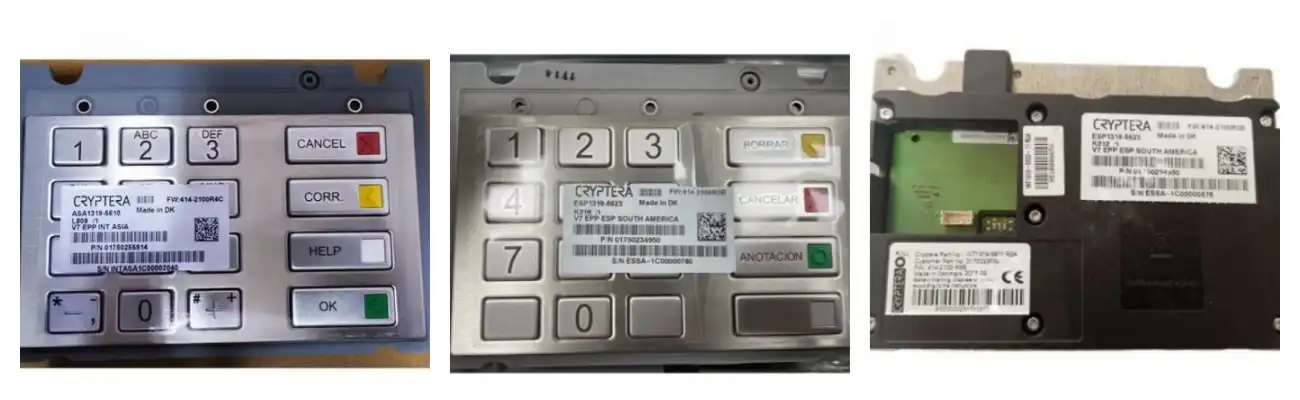
Understanding EPP V7 and Its Importance for Diebold Nixdorf Machines
What Makes the Encrypting Pin Pad Essential?
The EPP V7 is the main security link between customers and bank networks. It encrypts private user data before sending it. Unlike older PIN pad generations, this one deletes the master key right away when it senses physical hacking tries. This way, even if theft happens, no one else can get in without permission. This part is essential for financial institutions using Diebold Nixdorf systems to meet the strict Payment Card Industry Data Security Standards and keep transaction handling running smoothly.
Core Technical Specifications
Our EPP V7 units have better USB interfacing than older serial links, which cuts down on transmission delay. The improved PCI firmware protocols support asymmetric encryption methods, which lets you handle keys securely from afar without having to send a professional. The device works reliably in temperatures ranging from -10°C to +50°C, which makes it useful for install in both climate-controlled bank halls and outdoor kiosks. The control board (part number 01750240366) is the PCB assembly base for the main processing functions. It makes sure that the system works smoothly even when it's under constant load.
Available Configuration Options
We carry a variety of keyboard styles to meet the needs of people in different parts of the world. The international standard version (01750242200) works best for most deployments around the world. Other designs that are more specific include the USA PKI compliant model (01750242201), the German layout (01750242202), the French configuration (01750242203), the Spanish form (01750242204), and the Brazilian configuration (01750242205). The INT ST Cryptera type with improved security (01750262078) adds more layers of security to high-risk areas. When there is a lot of natural light, the high brightness choice (01750242207) makes the screen easier to see.
Preparing for EPP V7 Installation: Pre-Installation Checklist
Assessing Current System Compatibility
Check to see if your Diebold Nixdorf ATM type supports EPP V7 connection before you start the installation process. Check the hardware code version of the computer because old system software may need to be updated before the PIN pad works right. Write down the model and part numbers of the current PIN pad, making sure to include any changes or unique setups. This information is useful for figuring out what's wrong with possible compatibility problems during release.
Creating Comprehensive Data Backups
Keep all of the current ATM setup settings before you change any hardware. To keep your data safe, you should back up transaction logs, information about encryption keys (using the right security methods), and system setting files. Changing the PIN pad doesn't usually change the core data of an ATM, but sometimes problems happen that mean the system needs to be restored. Keeping up-to-date backups cuts down on healing time and keeps transaction information from being lost.
Gathering Installation Tools and Resources
Make sure you have a stable desk with enough light. Put together the tools you'll need, such as precision screwdrivers, anti-static wrist straps, and supplies for managing cables. It's important to read the installation instructions for your ATM model carefully because the mounting plate arrangements are different for each Diebold Nixdorf platform. Make sure you have the service keys and administrative passwords for the ATM that you need to get to its internal parts and system setup menus.
Coordinating with Vendor Support
Before starting a complicated repair, especially when replacing a fleet of units, talk to your parts provider. When someone asks RM about pre-installation questions, our expert team answers them within 24 hours and gives advice on model-specific issues and setup needs. We offer video remote support for real-time problem-solving, which helps techs deal with problems that come up out of the blue without having to delay rollout plans. This direct involvement cuts down on installation mistakes and makes sure that merging goes smoothly.
Step-by-Step Installation Process for EPP V7 on Diebold Nixdorf Machines
Physical Installation Procedures
Turn off the ATM fully and unplug it from any power sources. Using the right service keys to open the upper service panel will reveal the current PIN pad assembly. Carefully take off the old device's USB cord and any fixing hardware that is holding it in place. Take off the old gasket or overlay parts and check the fixing areas for harm or buildup of dirt. Clean the points of touch with isopropyl alcohol and let the surfaces dry all the way through. Place the new EPP V7 unit on the mounting bracket so that the plug ports line up with the machine's internal wiring. Use the fixing screws that came with the device to connect it securely, but don't tighten them too much or you could damage the circuit board. Connect the USB cord to the right port and make sure the link is facing the right way. Place the protected gasket or overlay parts on top of the keyboard, making sure they fit properly around the edges.
System Configuration and Activation
Turn the ATM back on and use administrator keys to enter supervisor mode. Go to the menu for external setup and choose the PIN pad device settings. Through USB scanning, the system should be able to find the new EPP V7 hardware on its own. If recognition doesn't work, check the links between the cables and try again. Start the process of adding the encryption key according to the security rules of your bank. This process is different for each company, but most of the time, it includes connecting to key management systems or using portable devices that load keys. For master key injection and working key generation, make sure you follow the rules set by your school. Do the key loading proof tests to make sure the cryptography is working right before moving on.
Post-Installation Testing and Validation
Do full practical testing of your ATM that includes all the kinds of transactions it can handle. Check that PIN protection works properly at every step of the process, including test purchases, balance requests, and cash withdrawals. Check the brightness of the screen and the tactile reaction of the keyboard to make sure that all of the buttons consistently record inputs. Test the tamper detection system by gently pressing on the device's edges and making sure the alarms go off as expected. Write down the information about the installation, such as the part numbers (like 01750242200 for international layouts or 01750242201 for USA layouts), the date of the installation, and the name of the worker who did it. Write down standard performance measures that can be used to compare future performance during regular maintenance checks. This paperwork is very important for quality control checks and guarantee claims.
Comparing EPP V7 with Previous Versions and Competitor Software
Improvements Over EPP V6 Architecture
There are clear improvements in speed between version 7 and version 6 of the encryption PIN pad. The slower serial ports in EPP V6 models have been replaced by USB communication, which cuts transaction processing delay by about 30%. The new firmware design allows more encryption method libraries, which gives you options as security standards change. The physical building includes stronger tamper detection sensors that work with less force, which speeds up the security reaction time.
Competitive Advantages in the Market
When compared to other PIN pad options from different companies, the EPP V7 works better with the Diebold Nixdorf system that is already in place. When you use integrated systems instead of third-party tools, you don't have to worry about compatibility issues or approval delays. Standardized mounting setups make it easier to install different ATM models. This means that field workers don't need to be trained as much, and big teams can be put into service for less money.
Cost-Effectiveness Considerations
While original maker parts usually come at a higher cost, RM offers cheaper options that don't lower the quality or safety standards. Before they are sent out, our QC staff puts our EPP V7 units through a lot of tests to make sure they meet or beat OEM standards for performance. We keep a large stock of all keyboard combinations, which lets us send quickly and keep machines running as much as possible. The 30-day guarantee covers both replacement parts and ongoing online help, which protects your investment and lowers the total cost of ownership.
Maximizing EPP V7 Benefits after Installation
Implementing Preventive Maintenance Protocols
Establish regular review times to check the state of the PIN pad, the integrity of the cables, and the security of the mounting. Every month, clean the keypad's surfaces with approved cleaners that won't harm the protection coats or tamper seals. Keep an eye on the system logs for strange error patterns that could mean hardware problems are starting to show up before they completely break. Regular repair makes devices last longer and stops them from breaking down when they're needed most, like during busy times.
Leveraging Advanced Security Features
Set the tamper response settings so that they follow the risk management rules of your school. The EPP V7 lets managers set their own alarm levels and actions, so they can find a good mix between security and practical needs. Set up encrypted log tracking to find possible attempts to break in, which will allow you to respond quickly to security events. Regular security checks make sure that the ways encryption keys are managed are still in line with changing government rules.
Accessing Ongoing Support Resources
You can access all of RM's technical documentation for all EPP V7 setups through our online help portal at atm-part.com. Our multilingual support team helps with resolving complicated problems that go beyond simple installation steps. Organizations that need custom setups or special interaction needs can use our customization services. With the help of our vast research and development (R&D) skills gained over twenty years in the ATM parts business, our engineering team can make changes to current modules or create new ones that are specifically designed to meet operational needs.
Conclusion
Successfully deploying the EPP V7 on Diebold Nixdorf ATM machines strengthens your security infrastructure while maintaining transaction processing efficiency. This guide has walked you through critical preparation steps, detailed installation procedures, and post-deployment optimization strategies. The device's advanced encryption capabilities, tamper-resistant design, and broad compatibility with various keyboard layouts (including part numbers 01750242202 through 01750242205 for regional configurations) make it an essential component for modern ATM operations. By following these systematic procedures and leveraging professional support resources, you ensure reliable long-term performance and regulatory compliance across your ATM network.
FAQ
Q1: What are the minimum system requirements for EPP V7 installation?
A: Diebold Nixdorf ATMs with USB 2.0 support and software versions that work with PCI PTS 4.x standards are needed for the encrypting PIN pad. For the EPP V7 to work, machines must have at least 5 watts of power available. Before you install it, make sure that your system software works with protected PIN block types and asymmetric key management protocols.
Q2: Can I migrate encryption keys from older PIN pad models?
A: Moving keys directly between versions of PIN pad hardware is not secure and usually goes against safety rules. It is standard practice to use your institution's key management system to make new master keys, which are then loaded into the EPP V7 device. This process keeps the audit trail standards for financial security systems and makes sure that the cryptography is correct.
Q3: Where can I obtain genuine EPP V7 units with proper support?
A: RM is a reliable source for EPP V7 parts, and their large collection includes all possible configurations. We have both brand-new and professionally repaired units in great shape in stock, and all of them come with a 30-day guarantee. For availability confirmation, technical details, and group prices for large purchases, please email our team at Tang@atm-part.com.
Partner with RM for Reliable EPP V7 Supply and Expert Support
HONGKONG RONG MEI TECHNOLOGY CO., LIMITED delivers comprehensive ATM component solutions addressing the complete spectrum of your operational needs. As a specialized EPP V7 maker with ISO9001-2008 certification, we supply encrypting PIN pads alongside more than 80% of ATM modules and components required for maintaining Diebold Nixdorf fleets. Our 3000 square meter facility houses dedicated mold rooms, injection molding departments, and quality control operations that ensure consistent product excellence. We provide customization services including hardware modifications and multilingual interface configurations, supported by 24-hour response times and video remote assistance capabilities.
Reach out to Tang@atm-part.com today to discuss your EPP V7 procurement requirements, explore our complete product catalog featuring part numbers from 01750240366 control boards to specialized layout configurations, and discover how our two decades of ATM parts expertise can optimize your supply chain efficiency while reducing maintenance costs.
References
1. Payment Card Industry Security Standards Council. PCI PIN Transaction Security Requirements for Encrypting PIN Pads, Version 4.0, 2021.
2. Diebold Nixdorf Technical Documentation. Self-Service Terminal Peripheral Integration Standards, 2022 Edition.
3. International Organization for Standardization. ISO 9564: Financial Services - Personal Identification Number Management and Security, 2019.
4. American National Standards Institute. ANSI X9.24-1: Retail Financial Services Symmetric Key Management, 2017.
5. European ATM Security Team. Physical Security Guidelines for Cash Dispensing Equipment, Technical Report 2020-04.
6. Financial Services Technology Consortium. Best Practices for ATM Component Lifecycle Management, Industry White Paper, 2021.
Learn about our latest products and discounts through SMS or email