- English
- French
- German
- Portuguese
- Spanish
- Russian
- Japanese
- Korean
- Arabic
- Greek
- German
- Turkish
- Italian
- Danish
- Romanian
- Indonesian
- Czech
- Afrikaans
- Swedish
- Polish
- Basque
- Catalan
- Esperanto
- Hindi
- Lao
- Albanian
- Amharic
- Armenian
- Azerbaijani
- Belarusian
- Bengali
- Bosnian
- Bulgarian
- Cebuano
- Chichewa
- Corsican
- Croatian
- Dutch
- Estonian
- Filipino
- Finnish
- Frisian
- Galician
- Georgian
- Gujarati
- Haitian
- Hausa
- Hawaiian
- Hebrew
- Hmong
- Hungarian
- Icelandic
- Igbo
- Javanese
- Kannada
- Kazakh
- Khmer
- Kurdish
- Kyrgyz
- Latin
- Latvian
- Lithuanian
- Luxembou..
- Macedonian
- Malagasy
- Malay
- Malayalam
- Maltese
- Maori
- Marathi
- Mongolian
- Burmese
- Nepali
- Norwegian
- Pashto
- Persian
- Punjabi
- Serbian
- Sesotho
- Sinhala
- Slovak
- Slovenian
- Somali
- Samoan
- Scots Gaelic
- Shona
- Sindhi
- Sundanese
- Swahili
- Tajik
- Tamil
- Telugu
- Thai
- Ukrainian
- Urdu
- Uzbek
- Vietnamese
- Welsh
- Xhosa
- Yiddish
- Yoruba
- Zulu
Diebold Nixdorf TP31 Printer Installation and Setup Guide
Installing the Diebold Nixdorf TP31 Printer properly keeps ATMs running smoothly and cuts down on costly downtime in financial settings. This thermal receipt printer part is designed to work with DN Series ATMs, such as the DN200, DN250, and DN450 types. The TP31 can print directly on thermal lines at 203 DPI and has a high-speed output range of 150 to 180 mm per second. It can connect to computers via USB 2.0 or RS-232 digital. For the printer to last as long as possible and keep making transaction receipts that banks, service companies, and equipment providers around the world can rely on, it needs to be installed, calibrated, and maintained correctly.
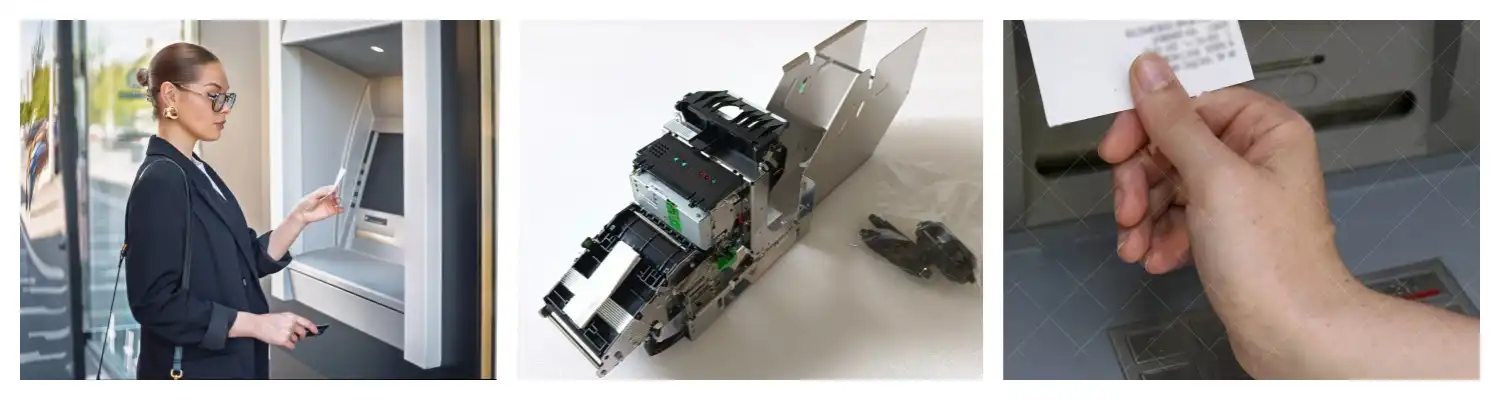
Preparing for Diebold Nixdorf TP31 Printer Installation
Preparation cuts down on installation mistakes and release time by a large amount, especially when operating multiple ATMs in different banking sites.
Technical Specifications and Checking for Compatibility
Before you unpack your Diebold Nixdorf TP31 Printer module, make sure it will work with the ATMs you already have. The module works with DN Series systems and needs to be connected to the ATM processor via either a USB 2.0 High Speed or an RS-232 Serial port. The printer's measurements must match the installation bay in your DN200, DN250, or DN450 chassis. Check your ATM service manual to make sure there is enough space. Power needs are met by the ATM's built-in power distribution, which usually sends controlled DC energy to the printer interface. The temperature range for operation is from 5°C to 50°C, so it can be used in climate-controlled indoor setups as well as more difficult outdoor through-the-wall ATM places where the weather changes.
Unboxing and Inspection Before Installation
When you get your Diebold Nixdorf TP31 Printer module from the seller, carefully check the box to see if there are any signs of damage from shipping. Check the packing list to make sure that all the parts in the box match what's on it. You should be able to find the Diebold Nixdorf TP31 Printer unit, mounting brackets, installation instructions, and a wire harness that is made for your ATM type. To make sure you got the right version, check part numbers 01750302897 for the normal configuration and 01750302898 for other versions. Check the thermal print head for dirt or scratches right after installation, as contamination can lower the quality of the prints. Check the auto-cutter device by slowly turning it by hand to make sure it works smoothly and doesn't get stuck.
Needed Tools and Setting Up the Workspace
Get the tools you need before you start installing so that your work doesn't get interrupted. You will need a set of precision screwdrivers with both Phillips and flathead heads, an anti-static wrist strap to keep fragile electronic parts safe, isopropyl alcohol and lint-free cloths to clean areas that come into contact with electricity, and a digital voltmeter in case you need to do some electrical testing. Set up a clean, well-lit work area close to the ATM that has enough air flow. Follow your bank's lockout/tagout safety steps to turn off the ATM fully and disconnect it from the mains power. This safety measure keeps the worker and the equipment safe while the module is being installed by preventing electrical shock.
Step-by-Step Installation and Setup Process
Methodical installation steps cut down on setup time and stop common connection issues that cause service calls.
Physical Installation and Mounting
To get to the printer bay, unplug the ATM from all power sources and open the service panel. If you are replacing a printer module, take out the old one and unhook the power and data cords, making a note of where they go for future use. Place the Diebold Nixdorf TP31 Printer module where it's supposed to go and make sure it lines up with the guide rails inside the frame. Tighten the fixing screws that came with the module in a diagonal pattern to make sure that the pressure is spread evenly and that the module fits properly against the base. Do not twist too much, as this can put stress on the printer body and make it less reliable in the long run.
Connection Options and Interface Configuration
To work with a variety of ATM controller designs, the Diebold Nixdorf TP31 Printer uses a number of different connectivity standards. Depending on how your system is set up, connect the wire adapter that came with the ATM to either the USB 2.0 High Speed port or the RS-232 Serial port on the controller board. RS-232 serial connections are backwards compatible with older systems, but the baud rate may need to be set manually. USB connections are easy to use because they just plug in and work. Keep wires away from parts that make heat and tie them down with cable ties to keep them from messing up mechanical systems. Make sure that the links are securely in place and that none of the pins are broken or bent.
Driver Installation and Printer Configuration
Turn on the ATM and wait for the running system to find the new hardware. Install WOSA/XFS-compliant drivers that are right for your ATM's software platform. These will make sure that it works well with transaction processing tools. Set up the communication settings, like baud rate (9600 or 19200 for RS-232 lines), data bits, parity bits, and stop bits, so they work with your ATM controller. Set the paper settings to 80 mm thermal paper rolls, which is the usual size for bank records. Adjust the printer's print density settings to find a good mix between readability and thermal head life. For most ticket formats, setting the printer to medium density is enough, unless you need very dark writing for barcode scanning or archiving reasons.
Common Troubleshooting and Maintenance Tips
Preventative maintenance and quick problem solving keep ATMs online for a long time and lower the cost of emergency service.
Resolving Paper Jams and Feed Issues
One of the most common problems with printers in ATMs is getting stuck on paper. If there is a jam, turn off the ATM and slowly open the Diebold Nixdorf TP31 Printer device by following the manufacturer's instructions. Carefully remove pieces of paper that are stuck in the machine without tearing them, because torn pieces can get stuck in the paper path and cause more jams. Check the paper feed wheels for any growth of debris or glazing that makes them less able to grip.
Use rubbing alcohol and a lint-free cloth to clean the rollers, and turn them by hand to get to the whole circle. Check that the thermal paper rolls are the right width and that the paper is put properly so that the thermal-reactive coating faces the print head. If the paper cores aren't lined up right or are too big, they can make feeding problems, so only use 80mm thermal paper rolls from reliable makers.
Print Quality Degradation and Thermal Head Maintenance
As the thermal head gathers waste from paper coatings and outdoor pollutants, the quality of the prints naturally gets worse. Thermal head cleaning should be done on receipts that have faded areas, lines, or characters that aren't fully formed. Turn off the printer and let the head cool down fully. While it's working, it gets hotter than 200°C. Use a lint-free cloth and rubbing alcohol to gently wipe the thermal element array.
Be careful not to damage the sensitive heating elements by applying too much pressure. Under normal circumstances, the thermal print head can move 100–150 km. However, rough surroundings and rough paper can shorten this range. Keep an eye on changes in print quality and replace the print head before it completely stops working, which can happen quickly during busy times.
Interpreting Error Codes and Diagnostic Messages
Standardized error codes sent by the printer to the ATM tracking software let the software know about its state and errors. Common codes include "paper-out" alerts when all the paper is used up, "cutter jam" alerts when the auto-cutter device hits resistance, and "temperature" alerts when the heat head goes above the safe working range. Check the diagnostic logs for your ATM software to find specific error codes.
Then, look at the printer repair instructions for more information on how to fix the problem. Many intermittent errors can be fixed by reseating wire connections or turning off and on the printer's power. On the other hand, constant errors mean that a component has failed and the module needs to be replaced. Keep your printer's firmware at the most recent version suggested by the maker. Regular firmware changes fix known software bugs and make it easier to handle errors.
Comparing Diebold Nixdorf TP31 with Other Thermal Receipt Printers
Knowing where a company stands in the market helps procurement teams make smart buying choices that meet business needs and stay within budget.
Thermal ticket printers from companies like Epson and Star Micronics are direct competitors of the Diebold Nixdorf TP31 Printer. However, these other options are more geared toward general-purpose point-of-sale (POS) uses than ATM integration. The Epson TM-T88V has a similar 203 DPI resolution and print speeds, but it doesn't have the strengthened auto-cutter that was made for the tough retraction cycle, in which receipts that haven't been collected must be reliably pulled back into the ATM frame. Temperature extremes and humidity can be hard on normal point-of-sale (POS) hardware, but the Star Micronics TSP143 types don't have the environmental tolerances needed for through-the-wall outdoor ATM installs.
The TP31 is a cheaper option to the TP35 printer module in the Diebold Nixdorf line of Products. Both use direct thermal technology and have about the same resolution. However, the TP35 has a better paper path design that makes it less likely for systems that process over 1,000 transactions every day to get stuck. The TP31's auto-cutter can make more than 1.5 million cuts, which is enough for most banking settings.
The TP35's can make up to 2 million cuts. Financial companies that have to repair their printers often under warranty should think about whether switching to the TP35 is worth the extra cost because it will require less upkeep. However, the TP31 is a great choice for low-volume areas and replacements where the current infrastructure can handle the TP31 form factor.
Purchasing and Procurement Guidance for TP31 Thermal Printer Modules
When ATMs are installed in more than one place, strategic buying has a direct effect on the total cost of ownership and the dependability of operations.
New and used Diebold Nixdorf TP31 Printer modules are both sold by authorized distributors and skilled ATM parts sellers. Each has its own benefits. New units that are made to the original specs last the longest and come with the fullest guarantee coverage. This makes them ideal for important setups where downtime costs are high. Refurbished modules go through a lot of testing and have their parts replaced.
They offer solid performance at lower purchase costs, making them good for deployments on a budget or keeping older ATM lines running until they reach the end of their useful lives. We keep both new and used printer units with the part numbers 01750302897 and 01750302898 in stock at HONGKONG RONG MEI TECHNOLOGY CO., LIMITED, so we can meet instant deployment needs without having to wait for long lead times.
Through tiered pricing systems, volume buying methods cut per-unit costs by a large amount. Setting up supply deals that lock in good prices and make sure parts are always available is helpful for banks and multi-location companies who manage fleets of DN Series ATMs. We have a large inventory of parts that go beyond full printer units. These parts include thermal print heads, auto-cutter kits, paper sensors, and mechanical parts. This parts-level support lets technical teams fix specific problems instead of replacing whole modules, which increases the useful life of assets and lowers waste.
When planning foreign exports to new markets in Southeast Asia, the Middle East, Africa, and Latin America, logistics are especially important things to think about. Standard lead time for modules is 15 to 20 working days from the time an order is confirmed. If installation times need to be shortened, air freight shipping choices are possible.
We offer various shipping options by sea, land, and air to meet the needs of customers with different levels of haste and budgets. All of the modules come with a 30-day guarantee and online technical support. This means that any problems that happen after installation can be fixed quickly through remote testing and multilingual help.
Conclusion
In conclusion, when it comes to difficult ATM settings where transactions can't be stopped, the Diebold Nixdorf TP31 Printer module is designed to work reliably. When installed correctly according to the manufacturer's instructions and maintained regularly, the printer will last longer and require fewer unexpected service calls. Knowing the device's technical specs, needs for compatibility, and troubleshooting steps gives expert teams the power to keep ATM uptime rates high. Strategic buying from experienced sources makes sure that you can get original parts at good prices and get quick expert support, all of which lower the total cost of ownership for financial service businesses with multiple locations.
FAQ
Where can I download official drivers and firmware for the TP31?
Authorized Diebold Nixdorf service routes are where you can get official WOSA/XFS drivers and firmware changes. Get the most up-to-date driver packages for your Diebold Nixdorf TP31 Printer controller platform and operating system version by contacting the company that makes the software or sells the parts.
How often do I need to clean the TP31's thermal head?
How often you clean relies on how many transactions are happening and how dirty the area is. Standard advice says that the heat head should be checked and cleaned every 10,000 receipts or once a month, whichever comes first. In places with a lot of traffic or a lot of dust, upkeep may need to be done more often to keep the print quality high.
Can the TP31 printer handle custom receipt formats with logos?
Yes, the printer can print bitmap images, which means that you can make your own receipts with bank logos, advertising messages, and QR codes. Graphics add to the work that the thermal head has to do and slow down the print speed a little, so make sure that the image size and complexity are just right to meet your needs for customization and speed.
Partner with RM for Your TP31 Printer Supply Needs
Since 2008, RM has been giving service companies and banking institutions around the world reliable ATM parts and thermal printer options. As an expert Diebold Nixdorf TP31 Printer provider, we keep a large stock of both new and used modules with part numbers 01750302897 and 01750302898 that can be sent to you right away. Our 3,000-square-meter ISO9001-2008-certified factory has separate departments for maintenance, quality control, molding, and injection molding to make sure that every part meets the strict standards for banking equipment.
We answer important questions within 24 hours and offer international online support to help with download and setup issues from afar. Get in touch with Tang@atm-part.com right away to talk about bulk prices for your ATM fleet or to get technical specs for special integration projects. You can look through our full list at atm-part.com, which has more than 80% of all the ATM circuits and parts on the market.
References
1. International Organization for Standardization. (2015). Banking and Financial Equipment Standards for Self-Service Terminals. ISO Technical Committee 68.
2. Financial Services Technology Consortium. (2019). WOSA/XFS Printer Service Provider Implementation Guidelines. CEN Workshop Agreement Documentation.
3. Thermal Printing Technologies Working Group. (2020). Direct Thermal Print Head Maintenance and Longevity Best Practices. Industry Standards Publication.
4. ATM Industry Association. (2021). Self-Service Terminal Reliability Metrics and Uptime Optimization Strategies. ATMIA Global Research Report.
5. Diebold Nixdorf Technical Services Division. (2022). DN Series ATM Printer Module Integration and Service Manual. Official Technical Documentation.
6. Banking Equipment Manufacturers Association. (2023). Total Cost of Ownership Analysis for ATM Component Procurement. BEMA Industry White Paper.
Learn about our latest products and discounts through SMS or email