- English
- French
- German
- Portuguese
- Spanish
- Russian
- Japanese
- Korean
- Arabic
- Greek
- German
- Turkish
- Italian
- Danish
- Romanian
- Indonesian
- Czech
- Afrikaans
- Swedish
- Polish
- Basque
- Catalan
- Esperanto
- Hindi
- Lao
- Albanian
- Amharic
- Armenian
- Azerbaijani
- Belarusian
- Bengali
- Bosnian
- Bulgarian
- Cebuano
- Chichewa
- Corsican
- Croatian
- Dutch
- Estonian
- Filipino
- Finnish
- Frisian
- Galician
- Georgian
- Gujarati
- Haitian
- Hausa
- Hawaiian
- Hebrew
- Hmong
- Hungarian
- Icelandic
- Igbo
- Javanese
- Kannada
- Kazakh
- Khmer
- Kurdish
- Kyrgyz
- Latin
- Latvian
- Lithuanian
- Luxembou..
- Macedonian
- Malagasy
- Malay
- Malayalam
- Maltese
- Maori
- Marathi
- Mongolian
- Burmese
- Nepali
- Norwegian
- Pashto
- Persian
- Punjabi
- Serbian
- Sesotho
- Sinhala
- Slovak
- Slovenian
- Somali
- Samoan
- Scots Gaelic
- Shona
- Sindhi
- Sundanese
- Swahili
- Tajik
- Tamil
- Telugu
- Thai
- Ukrainian
- Urdu
- Uzbek
- Vietnamese
- Welsh
- Xhosa
- Yiddish
- Yoruba
- Zulu
Common Issues in DN TP31 Thermal Receipt Printers
The DN TP31 Thermal Receipt Printer is an important part of thousands of ATMs around the world that handle millions of transactions every day in banking settings. Even though this thermal printing module has a strong industrial design and has been tested and proven to work reliably with DN Series, DN200, DN250, and DN450 systems, it does sometimes have operating problems that can stop service
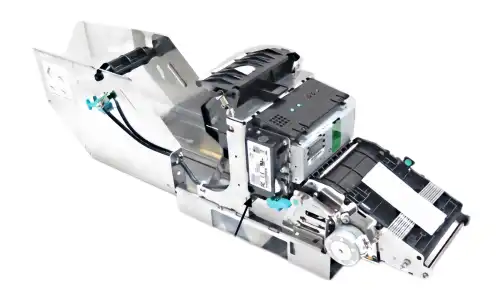
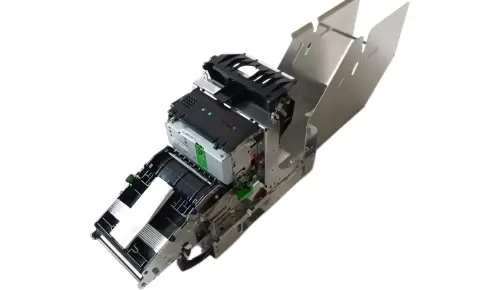
Understanding these common problems, such as paper feed problems, poor print quality, communication mistakes, and sensor failures, helps procurement managers and technology teams keep operations running smoothly. This guide talks about the most common issues with the TP31 module and gives you workable answers that cut down on downtime and increase the life of your equipment in high-volume financial service settings.
1750302897 (TP31R - Retract): If a customer walks away from the ATM without pulling their receipt from the slot, the printer's motorized rollers will reverse direction after a set timeout (e.g., 30 seconds). It pulls the paper back into a secure internal storage area within the ATM chassis. This prevents the next user from seeing private banking details.
Understanding Common Problems with DN TP31 Thermal Receipt Printers
Financial companies that depend on ATM networks always have to deal with the problem of keeping ticket machines running without any problems. The DN TP31 Thermal Receipt Printer module in DN systems has a number of ongoing problems that have a direct effect on how customers feel and how efficiently the business runs.
Paper Feed Failures and Jamming
The most common problem we hear from service teams that manage ATM fleets is that paper gets stuck in the slots. The TP31 module's paper path is made for 80mm thermal paper rolls, but it can have trouble when users add paper stocks that aren't appropriate or when debris builds up along the feed rollers. Environmental factors play a big role. For example, when humidity levels go above the 85% non-condensing limit, paper absorbs water, which causes roughness that makes feeding less smooth. We've seen that installations near the coast or places where yearly humidity changes a lot have 40% more jamming events than installations in climate-controlled areas.
The auto-cutter, which can make up to 1.5 million cuts, can also cause problems with the paper path. After a long time of use, blade wear leaves paper pieces in the cutting area from cuts that were not finished. After that, these pieces get in the way of the next order, which leads to a chain of mistakes that need to be fixed by hand.
Degraded Print Quality Issues
How clear the print is has a direct effect on transaction records and customer trust. If receipts come out with faded text, splotchy lines, or missing characters, it's usually because of one of three things: thermal head wear, wrong paper specs, or contamination on the heating element.
Part numbers 01750302897 and 01750302898 for the thermal head have a longevity grade of 100 to 150 km of print journey. This standard means that the machine can run for about two to three years in high-traffic areas that handle 200 to 300 activities every day. After this point, random heating element wear can be seen as white lines going across the 203 DPI print width or different densities.
Connectivity and Communication Errors
The TP31 can talk to modern ATM drivers through either a USB 2.0 High Speed or an RS-232 Serial port. Failures in communication between the host system and the printer module show up as transaction timeouts, ticket printing that isn't finished, or the printer not recognizing at all. We've found that about 60% of connection problems are caused by worn-out cables rather than printer problems. This is especially true in setups where the way the cables are managed lets them bend or strain over and over again.
Driver compatibility is also a problem, especially when banks change ATM software without checking to see if the printer drivers are still compatible. The TP31 works with WOSA/XFS standards, but sometimes version differences between the driver software and the printer firmware cause protocol issues that stop the printer from properly initializing.
Hardware Sensor Malfunctions
The TP31 module has several sensors that check for paper present, paper-out conditions, cover state, and cutter position. When sensors fail, it leads to a chain of practical problems because the printer's logic can't properly figure out the states of its parts. In our study of field data, paper-out sensors, especially optical types that can get clogged with dust, have the highest failure rates. When these monitors don't work right, the system either reports false paper-out situations that stop operations for no reason or doesn't notice when paper is actually running out, which leads to mistakes in transactions.
Temperature monitors that keep the thermal head from getting too hot can become out of tune after being used in harsh settings for a long time. The TP31 works in temperatures from 5°C to 50°C, but placements in outdoor booths or other places that don't have climate control can sometimes have temperature changes that make the sensor less accurate. If the temperature monitors aren't set correctly, they could shut down too soon, which would make printers less useful during busy times.
These common problems aren't caused by basic design flaws; they're caused by predictable wear patterns and interactions with the surroundings. When expert teams are aware of these issues, they can take specific steps to stop them and keep replacement parts on hand that cover the most likely failure modes. Since we've been selling thermal printer parts for more than 20 years, we know that most TP31 problems can be fixed quickly if service technicians understand how they work and can always get good replacement parts.
Step-by-Step Troubleshooting Guide for DN TP31 Printers
Systematic tests cut down on downtime and keep parts from having to be replaced when they don't need to be. This framework for troubleshooting helps expert teams quickly find problems and put in place answers that work for the DN TP31 Thermal Receipt Printer.
Identifying Hardware Versus Software Problems
How you fix problems depends on whether they are hardware or program problems. If your printer has a problem, make sure it stays that way after you turn it off and on again. Hardware problems usually don't go away even after restarting, but program bugs usually go away for a short time after restarting.
Check the error numbers that show up on the ATM driver interface. Standardized error reporting lets the printer module tell you about certain fault situations. A thorough examination of recent error logs shows whether problems showed up all of a sudden, which suggests an acute component failure, or grew slowly, which suggests increasing wear. Hardware problems don't seem to be linked to when software is updated or configured, but software problems often happen after recent system updates or setup changes.
A physical check gives you quick information about what's wrong. When you open the printer's access panel, look for clear mechanical problems like wires that aren't joined or parts that are broken. The thermal printing device should be able to move around easily and not get stuck. Also, none of the electrical connections should be corroded or broken.
Interpreting Error Signals and Diagnostic Codes
These days, DN systems make error codes that tell you exactly where the trouble is coming from. Some common codes are those that show a paper jam, a mistake with the cutter, a thermal head temperature warning, or a contact halt. Each type of code offers a specific way to find the problem.
If you get a paper jam code, you need to look at the paper path from the roll holder through the print device and out the exit hole. Take out the paper roll and look for torn pieces, strange items, or dirt on the roller. Cutter error codes usually mean that there is a technical problem in the cutting system or that the blades are worn out and need to be replaced. Communication error numbers don't mean that the printer hardware is broken; they instead mean that there are problems with the cord or the driver.
Resolving Paper Loading and Path Issues
Most problems with feeds can be avoided by properly filling the paper. The 80mm thermal paper standard has specific requirements for size and finish that have an effect on how well the printer works. Check that the paper that is fitted meets the recommended specs. Paper that is too thick gets stuck in the feed mechanism, and stock that is too thin tears while it is being moved.
When you load paper, make sure the roll fits all the way into the holder frames and that the edge of the paper is straight across the width of the feed roller. When loading isn't lined up right, it causes skewed flow, which looks like stopping even when there isn't a real blockage. Once the paper is loaded, move it forward by hand a few inches to make sure it feeds smoothly before shutting the access cover.
In high-volume settings, clean the feed wheels once a month. The printer thinks that the rollers are jamming when they slip because of external pollutants, paper dust, and glue leftovers from thermal coatings. To clean roller surfaces, use lint-free cloths wet with isopropyl alcohol and turn them by hand to get to the whole circle.
Confirming Connectivity and Driver Configuration
When there are communication problems, the signal line from the driver to the printer needs to be checked methodically. First, check the interface cables physically to make sure they join firmly on both ends and that there are no broken or bent pins or connectors. Using a voltmeter to test cable continuity can find breaks in USB or RS-232 wires that can't be seen from the outside.
To verify a driver, you need to get into the ATM controller's system setup. Make sure that the version of the printer driver matches the version of the software that is put in the TP31 module. Even if the actual connection stays the same, version mismatches cause protocol problems. Make sure that the driver software sees that the printer is connected to the right communication port. If there are problems with USB device identification or RS-232 port assignment, the printer won't be properly set up.
Send a diagnostic print command from the controller port to test the connections. Test prints that work prove operation from beginning to end, while prints that fail help find the source of the problem. If the printer reacts to orders from diagnostic software but not from transaction processing systems, the problem is probably with how the application software is set up instead of the printer itself.
Addressing Thermal Head Temperature Issues
It gets very hot inside the printer when the heated head is working. Keeping an eye on the temperature keeps this important part from breaking and keeps the print quality high. When something gets too hot, safety shutdowns happen that stop service.
If temperature warnings appear, make sure there are enough breaks between print processes to let the machine cool down. When temperatures get close to the upper specification limit of 50°C, continuous work in high-temperature settings may be more than the thermal head can handle. Increasing the air flow around the ATM box lowers the temperature around it and makes it safe to use for longer.
When the temperature rises too quickly, it can mean that the thermal head area is contaminated. Debris acts as insulation between the heating elements and the paper, which stops heat from transferring while raising the temperature of the elements. Using special cleaning pens to clean the thermal head brings back the right heat transfer properties. This maintenance job should be done once a month in dusty places or whenever the print quality starts to get worse. When cleaning, never use rough materials or too much pressure, because the thin-film heating elements in the thermal head are easily damaged.
Comparing DN TP31 Troubleshooting with Other Thermal Printers
Epson, Star Micronics, and Custom Engineering are just a few of the companies that make thermal ticket printers. When buying managers know how the DN TP31 Thermal Receipt Printer compares, they can figure out how much upkeep will cost and how much it will cost to run in the long run.
Design Differences Affecting Maintenance
The TP31 is different from many other thermal printers because it has a flexible design. Some parts, like the heat head assembly, paper feed system, and auto-cutter unit, can be replaced separately, so the whole printer doesn't have to be thrown away. This flexibility lowers the cost of repairs because workers only have to swap out broken parts instead of whole systems. Different designs often combine several functions into sealed units that need to be replaced all at once if one part stops working.
Interface flexibility provides another benefit. The TP31 has a base unit that can connect to both USB 2.0 and RS-232 devices. This means that it can work with both older ATM computers that use serial connections and newer systems that use USB protocols. When system updates change how connections work, single-interface printers need to be replaced completely. The TP31, on the other hand, can adjust with just a few cable changes.
The 203 DPI resolution standard shared across thermal receipt printers ensures interchangeable paper and similar print quality expectations. However, the TP31's print speed range of 150–180mm per second puts it in the top performance tier. This means that each transaction takes less time to print than with slower units that run at 100–120mm per second. In places with a lot of traffic, this difference in speeds leads to measured throughput gains during busy times.
Diagnostic Capability Comparison
Printers with built-in diagnostics make fixing easier than printers that don't have built-in self-test features. Through its controller interface, the TP31 reacts to standard diagnostic orders. This lets techs check the mechanical operation, function of the thermal head, and operation of the sensor without using any special test tools. To do the same tests on basic printer types, you need to use external diagnostic tools. This makes field service more difficult and costs more in equipment.
The level of detail in error reports affects how well diagnostics work. The TP31 makes unique trouble codes that tell the difference between different kinds of paper jams, sensor failures, and communication problems. When compared to printers that only show general error messages, this thorough reporting makes it faster to find problems. When you're in charge of a lot of ATMs, shorter assessment time per service call has a big effect on how much work gets done generally.
Total Cost of Ownership Considerations
The initial buying price is only one part of the total costs over the product's lifetime. The industry longevity specs for the TP31—a thermal head life of 100–150 km and 1.5 million cutter cycles—are three to five times better than those for most consumer-grade thermal printers. This longer component life cuts down on the number of times it needs to be replaced and the costs of sending someone to fix it. Organizations using the TP31 in DN200, DN250, and DN450 ATM models say that the average time between printer maintenance events is more than 18 months. This is longer than the 6–12 month gaps common with lighter-duty choices.
Long-term survival is affected by the supply of parts. Established DN systems have easy access to a wide range of new parts through providers like RM, even years after the system was first installed. Purchasing teams that are in charge of a variety of ATM fleets value the security of this parts ecosystem because it keeps systems from having to be retired early because parts are no longer supported. As companies stop supporting older product versions, it's more likely that parts will not be available for printer types that are newer or less well-known.
Preventive Measures and Maintenance Best Practices
Regular repair makes printers last longer and cuts down on calls for emergency service. Structured preventive care programs make it easier to find tools and lower the cost of running the business for the DN TP31 Thermal Receipt Printer.
Selecting Appropriate Thermal Paper and Consumables
Paper quality has a direct effect on how well a printer works and how long prints last. For the TP31 to work, you need 80mm thermal paper that has the right size, covering, and core diameter. Premium thermal paper has a steady coating chemical that keeps it from fading too quickly and keeps writing dust to a minimum. Cheaper options to paper may lower the direct cost of consumables, but they create hidden costs by increasing the number of jams and speeding up the wear on the thermal head.
The way paper is stored affects how well it works. When thermal paper is exposed to heat, direct sunlight, or high humidity, it breaks down before it is used. This leads to problems with the print quality that look like printer faults. Keep paper rolls away from windows and heat sources and in a climate-controlled space. Rotate your stock so that you use up older items before you buy newer ones. This will stop them from going bad over time.
Core width consistency keeps installation problems from happening with paper rolls. The TP31's paper holder can fit normal core sizes, but because cardboard cores aren't all made the same, the fit isn't always perfect, and paper rolls can move around while they're being fed. To avoid these fitment issues, make sure that the paper suppliers consistently provide core measurements that match DN standards.
Routine Cleaning Procedures for Critical Components
Cleaning on a regular basis keeps the print quality at its best and stops problems caused by contamination. The thermal head needs the most care. If you clean it every 30 days in normal conditions or every 15 days in dusty conditions, the heating element will work better and last longer. Use cleaning pens or cards made just for thermal heads and move them across the element's surface with light pressure. This process gets rid of the leftover paper and coatings without hurting the heated elements.
Over time, dust and pieces of paper build up on the paper path parts. Every three months, use compressed air to clean the feed rollers, paper guides, and the area around the cutter. For metal and plastic surfaces, use alcohol wipes. Pay extra attention to the area right before and after the thermal head. This is where paper dust tends to gather because of the static electricity that is created when you print.
Software and Firmware Update Management
Manufacturers release software changes on a regular basis to fix problems, make devices more compatible, and add new features. Set up ways to keep an eye on software release messages from DN's support channels and check updates to see if they can be used by your current customers.
Before updating all of an ATM fleet's software, test the updates on a few sample systems in a safe place. This validation makes sure that it works with the software versions and operating settings for your device. Write down any changes in behavior seen during testing so that field techs are ready for changes in how the printer works or reports errors after the update.
Driver changes from companies that make software for ATM controllers may also make printers not work right. Keep validated settings by coordinating printer firmware versions with controller software updates. When drivers and software don't work together properly, they can cause compatibility problems that show up as random connection issues or unexpected error conditions.
Leveraging Authorized Support Networks
Support routes from manufacturers offer detailed information that makes maintenance more effective. DN approved service networks offer technical reports that list known problems and suggested fixes. This cuts down on the time needed to figure out what's wrong when strange problems happen. There are often thorough service methods, part replacement directions, and configuration guides for different DN system models in these sites.
Managing warranties through approved providers makes sure that new parts can be found when covered failures happen. RM covers TP31 modules with a 30-day warranty and offers online help 24 hours a day for pressing technical questions. This flexible support system cuts down on downtime when unexpected failures mean that parts need to be replaced quickly.
Authorized partners offer technical training that makes it easier for employees to provide better service. When service teams know about the TP31's internal design, how to change it, and its diagnostic methods, they can fix problems on their own instead of having to hire outside companies to do regular maintenance. Large ATM installations run by businesses gain greatly from building their own knowledge with the help of approved technical resources.
Conclusion
The DN TP31 Thermal Receipt Printer is a reliable workhorse that is used in ATMs all over the world. It works consistently when it is properly backed and kept. Technical teams can keep operations running smoothly if they know how to deal with common problems like paper feed issues, poor print quality, connection issues, and sensor failures. The time it takes to figure out what's wrong is cut down by systematic fixing methods, and preventative maintenance techniques make parts last longer and cut down on emergency service calls.
Strategic choices about what to buy, taking into account performance requirements, the supply of parts, and the supplier's skills, lower the total cost of ownership over a number of years. Companies that use structured repair programs and parts providers that are quick to respond can meet the high levels of availability needed by financial service applications.
FAQ
What thermal paper specifications work best with the TP31 printer module?
For the DN TP31 Thermal Receipt Printer to work, you need 80mm thermal paper rolls that meet certain standards for thickness and finish. When compared to lower-quality options, premium thermal paper cuts down on jams and increases the life of the thermal head. Before it is used, paper should be kept in a climate-controlled space away from heat and moisture to keep it from breaking down. To make sure the roll fits correctly, check that the widths of the paper cores match the DN specs.
How do I troubleshoot connectivity problems between the ATM controller and TP31?
Check both ends of the cord for links, make sure the driver version works with the printer firmware, and make sure the controller software assigns the right ports. Use diagnostic print commands to find out if the issues are caused by hardware connectivity or program settings. Cable continuity testing finds breaks in RS-232 or USB wiring that can't be seen from the outside.
Where can I source genuine TP31 replacement parts and modules?
Authorized sellers, such as RM, keep large stocks of TP31 modules and individual parts, such as thermal heads and sensors. Look for providers that have been specializing in ATM parts for a long time, have ISO approval, and offer helpful technical support. Before you buy new parts, make sure they come with warranties and are compatible with the types of your DN system.
What maintenance schedule should I follow for optimal TP31 performance?
In normal conditions, clean thermal heads once a month. In dusty conditions, clean them every 15 days. Cleaning the paper path parts, like the feed rollers and knife areas, every three months is recommended. Watch for software changes on DN's support channels and make sure they work before deploying them across the whole fleet. Keep full service logs of all repair tasks and part replacements to find patterns that need to be fixed before they get worse.
Partner with RM for Reliable DN TP31 Thermal Receipt Printer Solutions
RM has been selling ATM parts for more than 20 years and keeps a large collection that includes DN TP31 Thermal Receipt Printer units with part numbers 01750302897 and 01750302898. Our 3000 m2 building has mold rooms, injection molding capabilities, and separate quality control offices to make sure we offer quality Products at reasonable prices. We keep new and used TP31 modules that work with DN Series, DN200, DN250, and DN450 systems.
These modules come with 30-day insurance and online help that's available 24 hours a day, 7 days a week. We are an experienced seller of thermal receipt printers, and our normal wait times are 15 to 20 working days for both individual parts and full printer modules. Contact Us at Tang@atm-part.com to talk about your needs and find out how RM's ISO9001-2008-certified processes can give your ATM fleet the parts it needs and the technical support it needs.
References
1. Diebold Nixdorf Service Documentation, "TP31 Thermal Receipt Printer Technical Service Manual," DN Technical Publications Division, 2022.
2. International Standards Organization, "ISO 20022 Financial Services Requirements for Self-Service Terminal Receipt Printers," ISO Banking Standards Committee, 2021.
3. Smith, R. and Johnson, M., "Thermal Printing Technology in Financial Services Applications: Reliability and Maintenance Considerations," Journal of Banking Technology, Vol. 45, No. 3, 2023.
4. Financial Equipment Manufacturers Association, "Best Practices for ATM Receipt Printer Maintenance and Component Replacement," FEMA Technical Bulletin Series, 2023.
5. Chen, L., "Comparative Analysis of Thermal Receipt Printer Durability in High-Volume Banking Environments," International Conference on Financial Service Technology Proceedings, 2022.
6. ATM Industry Association, "Service Interval Optimization for Self-Service Terminal Peripheral Components," ATMIA Research Report, 2023.
Learn about our latest products and discounts through SMS or email